







Best WordPress Black Friday Deals (2025)

Best WordPress Black Friday Deals (2025)

Best WordPress Black Friday Deals 2025

In this post, we’ve rounded up the Best WordPress Black Friday Deals (2025). Whether you’re a seasoned WordPress pro or just getting started, these exclusive offers are here to boost your website without stretching your budget. Get ready to explore the most exciting savings of the year.

From premium themes like Phlox to powerful design tools like Depicter, this year’s Black Friday offers incredible opportunities to enhance both the look and performance of your site.

Also, don’t forget to check out Best WordPress Halloween deals. You don’t want to miss that.


Best Deals

phlox 720_380

Phlox

Featured
Phlox is the best Elementor multipurpose theme, trusted by over 100,000 active users and packed with more than 300 complete Elementor demos. Lightweight, modern, and fully customizable, Phlox powers every kind of website from blogs and portfolios to business sites, agencies, and online stores. With 49,000+ sales on ThemeForest and years of proven performance, it remains one of the most popular WordPress themes ever built. Don’t miss this year’s Black Friday offer to grab Phlox at an unbeatable price and elevate your website design with premium quality.

Coupon code: Auto-applied Save 30%
Validity: 15 Nov 2025 to 5 Dec 2025
Get The Deal
Screenshot 2025-11-09 11.06.22

Jupiter X

Jupiter X is Artbees' powerful WordPress website builder, known for its flexibility, design excellence, and adaptability. It’s trusted by nearly 200,000 businesses globally, offering a complete solution for creating and managing websites across various industries with ease. Jupiter X dispenses you of Elementor Pro, with native alternative features and a one-time payment.

Coupon code: 2025BF20 20%
Validity: 19 Nov to 2 Dec 2025
Get The Deal
depicter 720_380

Depicter

Featured
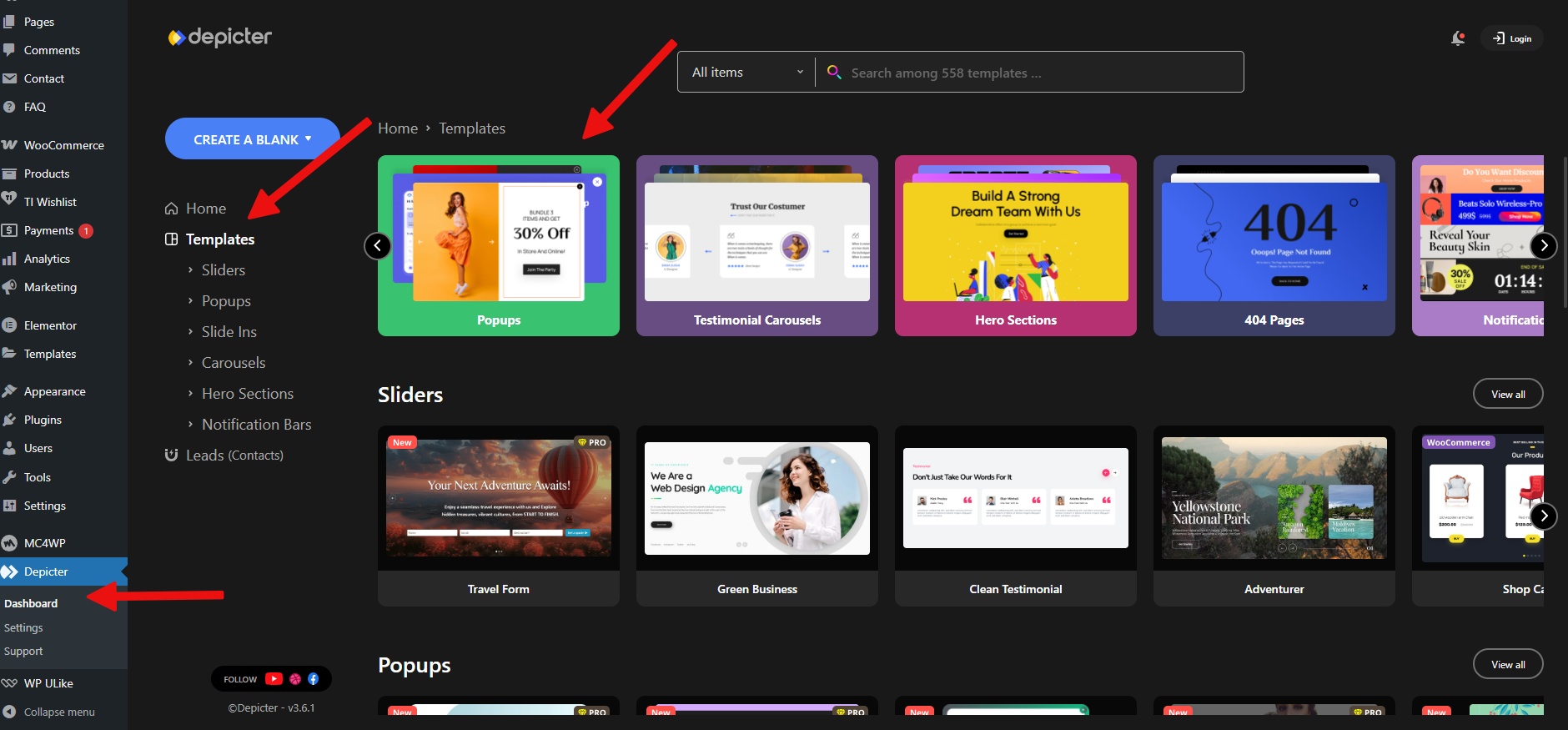
Depicter is the #1 AI-powered builder for creating engaging Popups, Interactive Sliders, Feedback Surveys, High-impact Notification Bars, Stunning Carousels, and Eye-catching Hero Sections, trusted by more than 100,000+ happy users on their daily usage! Boost engagement and sales with powerful Popups (email subscriptions, exit intent offers, promotions, cart abandonment reminders, campaigns) and Notification Bars. Build stunning WordPress sliders, carousels, hero sections, and slideshows, from video and image sliders to WooCommerce product showcases, testimonials, galleries, and more.
Coupon code: Auto-applied Save 70%
Validity: 15 Nov 2025 to 5 Dec 2025
Get The Deal
sellkit-banner-black-friday-4

SellKit

SellKit addresses a range of checkout challenges, such as low order values, slow conversions, and limited engagement. Supercharge your sales with customized checkouts, order bumps, progressive discounts, and intelligent coupons through SellKit.


Coupon code: 2025BF50 50%
Validity: 19 Nov to 2 Dec 2025
Get The Deal
master 720_380

Master Slider

Featured
Master Slider is an SEO friendly, responsive image and video slider, trusted by over 90,000 active users and 31,500 ThemeForest sales. With smooth, hardware-accelerated transitions and true touch swipe navigation, it offers a premium, lightweight, and intuitive experience that works perfectly with any theme. Don’t miss this year’s Black Friday offer to get Master Slider at a special discount and create stunning, interactive sliders for your website.


Coupon code: Auto-applied 30%
Validity: 15 Nov 2025 to 5 Dec 2025
Get The Deal
Screenshot 2025-11-09 11.01.15

WPDone

Built by Artbees, WPDone is a white-label custom development service for WordPress and WooCommerce offering a variety of solutions to meet specific client needs in areas such as Custom WP & Woo Development, Converting Design to WP, Theme Customization, Security & Performance Optimization, and Custom Design.


Coupon code: 2025BF50 50%
Validity: 24 Nov to 24 Dec 2025
Get The Deal
Best Photography Website Templates

Best Photography Website Templates

If you are a photographer, your website is more than just an online presence — it’s your portfolio, your digital studio, and the first impression for your potential clients. Luckily, you don’t need to start from scratch. There are many ready-to-use photography website templates that make it simple to create a beautiful site without touching code.

In this article, we’ll go through some of the best free and premium options available today. Let’s dive in.

Phlox Theme

Phlox is one of the most flexible WordPress themes out there, and it’s especially popular among creative professionals. It’s fully integrated with Elementor, which means you can drag and drop every part of your design without coding.

For photographers, Phlox offers multiple ready-made templates designed specifically for showcasing visual work. Some examples include:


Why photographers love Phlox:

  • Dozens of ready-to-import demos.
  • 1-click import
  • Easy Customization
  • Fast and SEO-friendly.
  • Built with performance in mind.
  • Full control over layouts, fonts, and colors.

If you’re looking for a professional yet flexible solution, Phlox should be your first choice.


2. Astra

Astra is one of the most popular WordPress themes, and the free version already includes starter templates for creatives. It’s lightweight, fast, and works perfectly with page builders. Photographers can use its simple layouts to create sleek portfolios that load quickly.


3. OceanWP

OceanWP is another powerful free theme with high customization options. Its clean and flexible design makes it suitable for building galleries and portfolios. It also integrates well with popular plugins, so you can add advanced features as your site grows.


4. Neve

Neve is a modern WordPress theme with many starter sites, including ones that are perfect for photographers. Its one-page style demos are especially useful if you want a simple portfolio site without too many pages. It’s also highly responsive, so your photos look great on any device.


5. Zakra

Zakra is a free theme that comes with multiple demos, including creative layouts for photographers. It’s user-friendly, works with major page builders, and is easy to customize even for beginners.


6. Photography by VW Themes

If you want a free WordPress theme that is built specifically for photography, this one is worth checking out. It includes a full-screen slider, gallery sections, and portfolio layouts that help you showcase your images beautifully.


Bonus: Depicter – A Must-Have Plugin for Photographers

Choosing the right theme is important, but adding extra visual impact can take your website to the next level. That’s where Depicter comes in.

Depicter is a powerful slider and content presentation plugin. For photographers, it’s perfect to:

  • Create stunning image sliders.
  • Build interactive photo carousels.
  • Add animations and transitions to tell a story.
  • Ensure all visuals look great on mobile devices.

With its drag-and-drop editor, you don’t need design or coding skills. You simply pick a template and start building beautiful slideshows in minutes.


Final Thoughts

Building a photography website doesn’t have to be complicated. With the right photography website templates, you can launch a professional-looking portfolio in just a few clicks.

If you want flexibility, creative freedom, and dedicated photography demos, start with Phlox Theme. Combine it with Depicter for advanced galleries and animations, and you’ll have a photography site that truly stands out.

How to Create a Carousel with Phlox

How to Create a Carousel with Phlox

What is a Carousel?

A carousel is a dynamic and interactive slideshow element used on websites to display multiple pieces of content within a limited space. It allows users to scroll or swipe through a series of items, such as images, blog posts, or product cards, without needing to load a new page. Carousels are widely used in modern web design because they help present content in a visually appealing and organized way.

They’re perfect for showcasing featured content like testimonials, portfolio items, image galleries, or promotions. One common use case is displaying the latest blog posts on your WordPress website. Instead of listing them statically, a carousel lets you highlight recent articles in a scrollable format that catches the visitor’s attention and improves user engagement.

Adding a Post Carousel to the Homepage with Phlox Theme

Now let’s see how we can use Phlox to add a carousel element featuring the latest blog posts to the homepage of our website.

To install Phlox, go to the Appearance menu and open the Themes section. Click on Add Theme, then search for Phlox. Once you find it, click the Install button and then activate it.
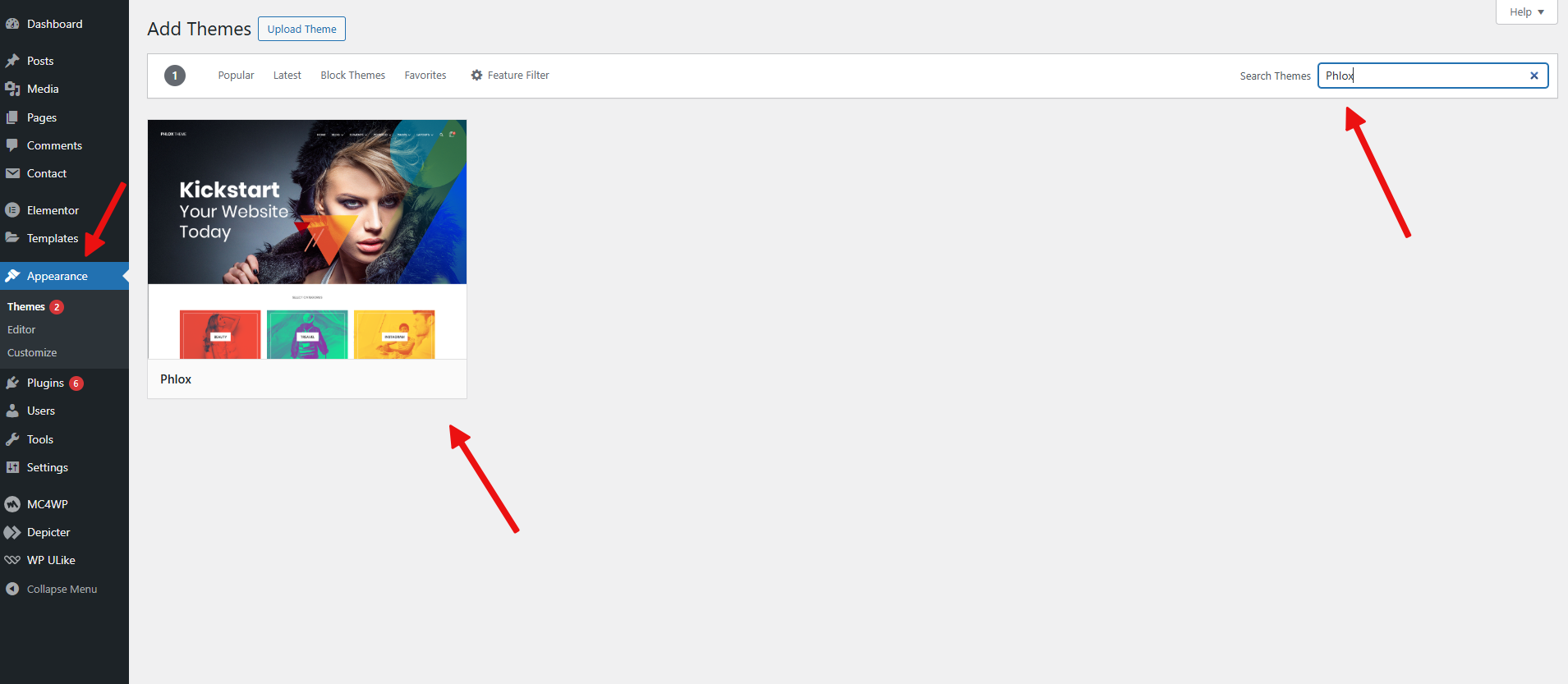
Installing Phlox

To get familiar with importing the ready-made demos, watch the video tutorial below:


Ok, so after getting started with the Phlox, this is an overview of our website, which we created by importing one of the ready-made Phlox demos. We want to display a carousel of the latest blog posts in the designated section.

The Homepage of the website


The first step is editing our page with Elementor:
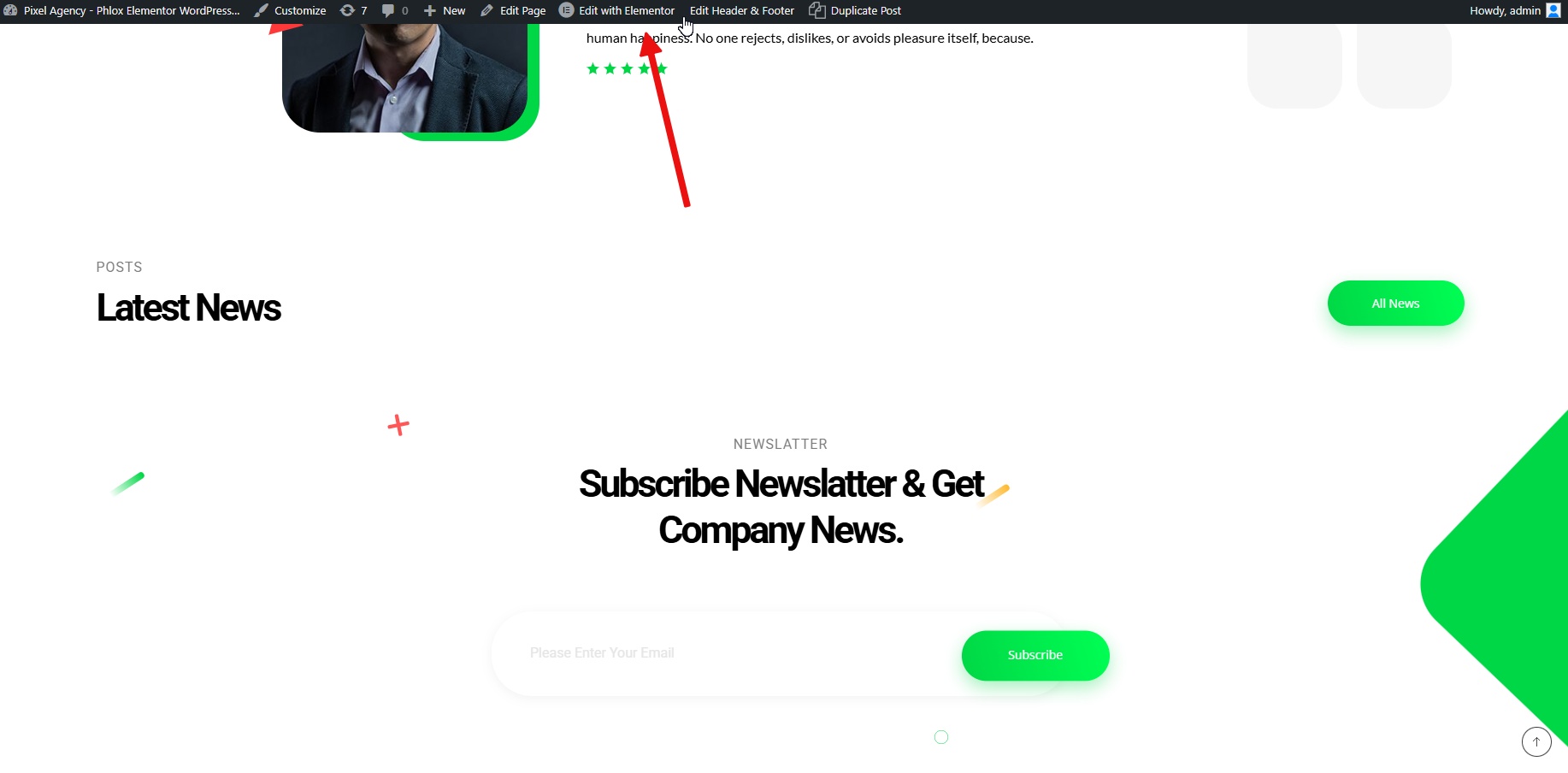
Editing the Page with Elementor


Search for the term “Carousel” in the widgets section. As you can see, Phlox offers several widgets with this feature for various purposes. Here, we’ll add the Grid & Carousel Posts widget to the page.
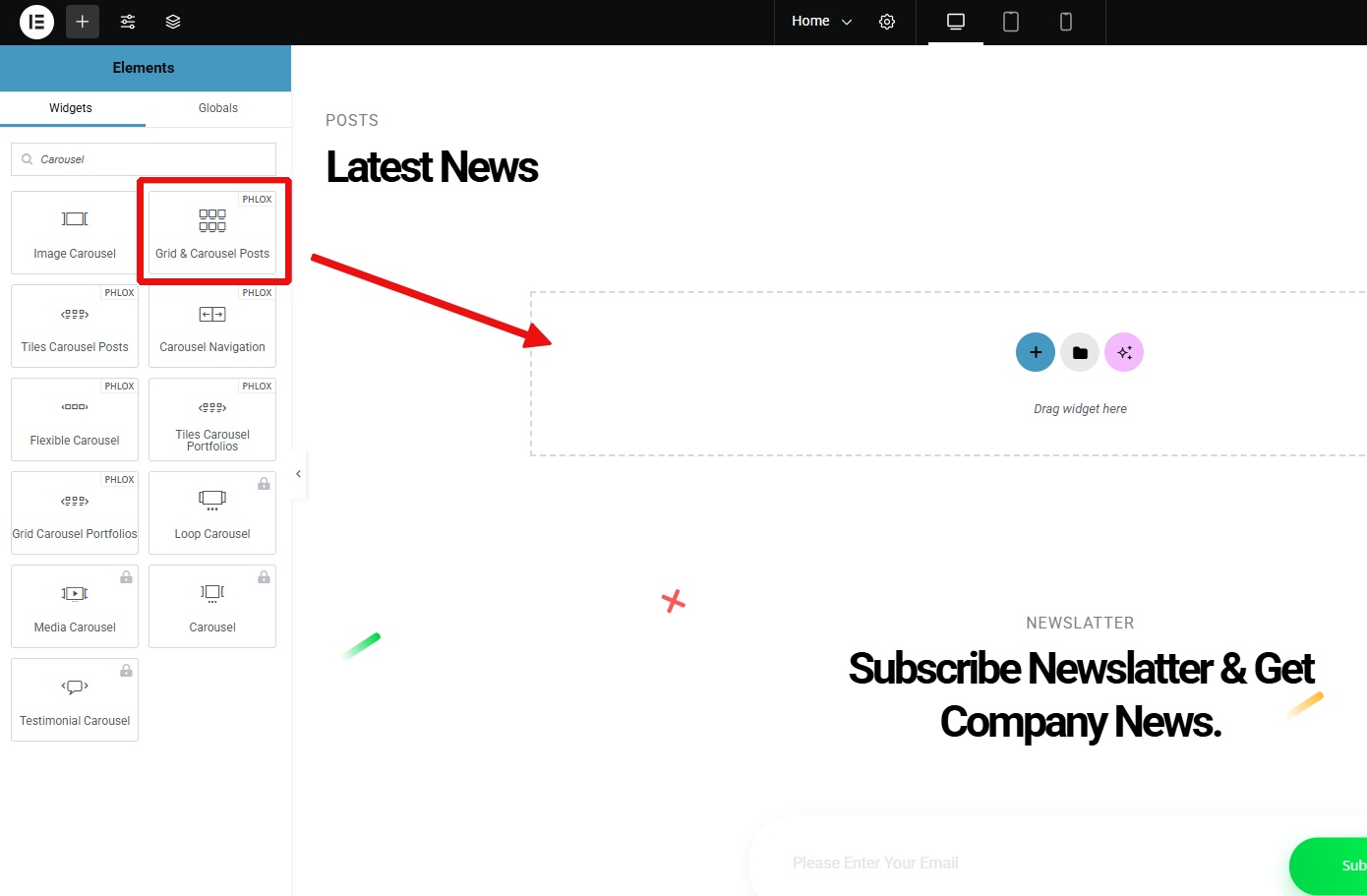
Adding the Grid and Carousel Posts widget to the page


As you can see, our beautifully designed carousel, which displays the latest posts, has been placed perfectly. Note that there are various options available to control its behavior and appearance, including autoplay, the number of columns, different filters for loading specific posts, and more.
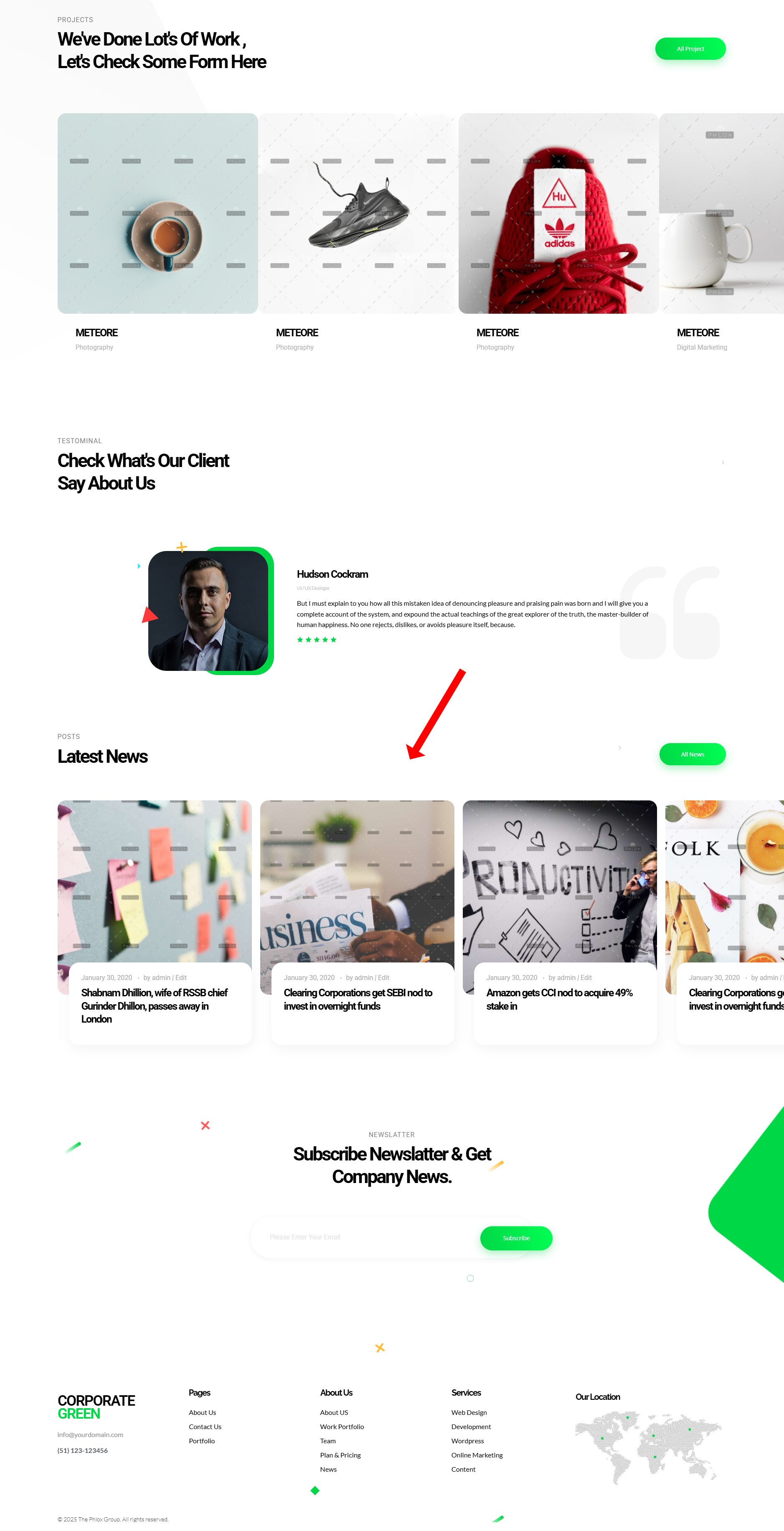
The website homepage after adding the Carousel widget

Best WordPress Plugins with AI

Best WordPress Plugins with AI

What Are AI WordPress Plugins?

AI WordPress plugins are add-ons that bring artificial intelligence into your site. Instead of doing everything manually, these plugins use smart technology to automate tasks.

Some examples include:

  • Writing and optimizing content with AI.
  • Designing better layouts using AI suggestions.
  • Chatbots that answer visitor questions automatically.
  • AI tools that generate images, summaries, or translations.

The demand for AI in WordPress has grown quickly because it saves time and increases website performance without needing advanced technical skills.


Benefits of Using AI Plugins in WordPress

Using AI tools inside WordPress can make your website easier to manage, faster to update, and more enjoyable for both you and your visitors. Here are some of the main ways AI plugins can help:


Save Time

AI can handle time-consuming tasks like writing blog drafts, product descriptions, or email newsletters in just a few seconds. Instead of starting from a blank page, you can use an AI content generator to create the first version and then simply refine it.

A blogger who usually spends two hours writing a 1,000-word post can use a content generator plugin to generate a full draft in minutes, then edit it to match their tone and voice.


Better User Experience

AI-powered chatbots, recommendation engines, and personalization tools can make your visitors feel more engaged and supported. These tools help people find what they’re looking for faster, answer questions instantly, and guide them through your site.

An online store can use a chatbot plugin like ChatBot to answer product questions, recommend items, or show shipping details 24/7 without any human staff needed.


Automate Repetitive Tasks

Many website tasks are repetitive like resizing images, translating content, or writing basic FAQs. AI plugins can automate these steps, so you can focus on more creative or strategic work.

A multilingual business website can use TranslatePress to automatically translate its pages into multiple languages instead of hiring translators or copying text manually.


Improve Content Creation & Design

AI tools can suggest better layouts, color schemes, and even write captions or headlines that fit your design. They help you stay creative and professional, even if you’re not a designer or writer.

You just describe what you want for example, “a modern hero slider for a digital agency” and Depicter’s AI-powered Slider Builder automatically designs it with the right layout, background, and text animations. It’s a fast and creative way to make visually impressive sections without needing to design them manually.


Make Smarter Decisions

AI can analyze how people interact with your website and give suggestions to improve conversions or engagement. Instead of guessing what works, you can rely on data-driven insights.

A blogger using ExactMetrics with AI insights might learn which posts get the most attention and receive personalized tips on when and how to publish for better engagement.


Best AI WordPress Plugins

Here are some of the top AI plugins worth checking out:
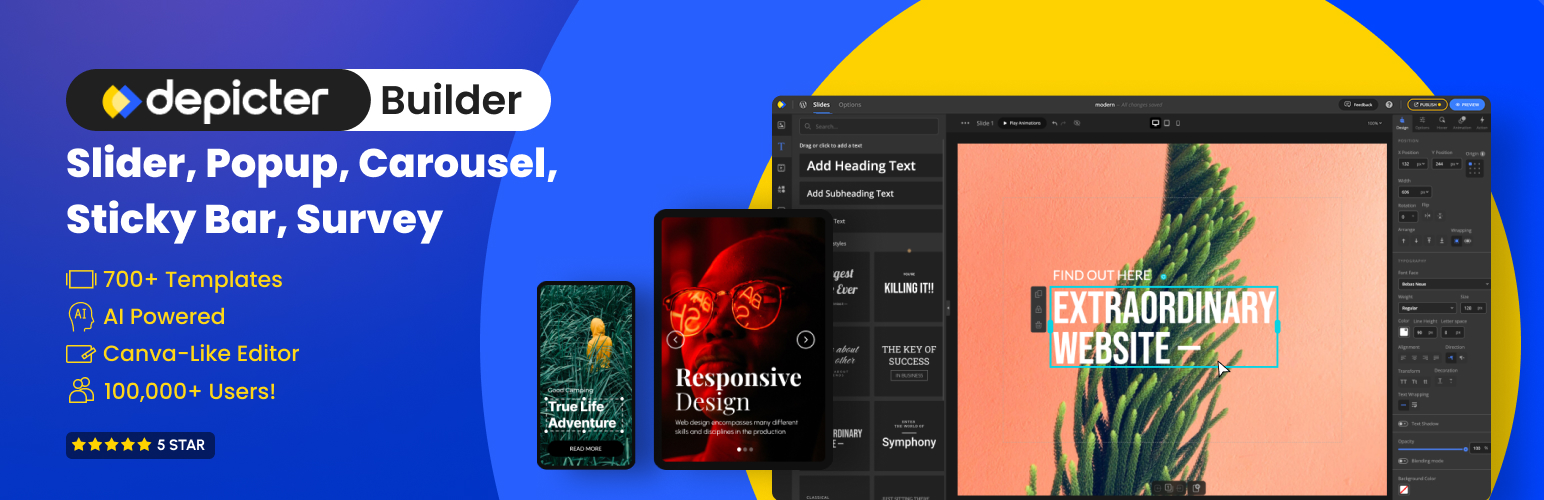
Depicter

Depicter Builder

Depicter brings the power of AI into WordPress design, offering a smart and intuitive way to create stunning visuals. Its AI Slider Builder can instantly design eye-catching layouts just by analyzing your content titles and input data. The AI then suggests the best layouts, transitions, and animation styles that match your brand’s tone making the creative process much faster and easier.

This makes Depicter a perfect choice for designers, marketers, or website owners who want to build professional-quality sliders without needing deep design skills. The AI helps you produce polished, on-brand visuals that look like they were made by a professional designer all within minutes.

Another standout feature is its AI Background Remover, which allows you to cleanly remove image backgrounds with a single click, directly inside the Depicter editor. This feature saves a lot of time when preparing visuals for your sliders, product showcases, or hero sections, letting you focus more on creativity rather than manual editing.


Best For: Designers, marketers, and website owners who want to create professional, interactive sliders quickly.
Key Features:
  • AI Slider Builder for smart layout generation
  • One-click AI Background Remover for clean visuals
  • Intelligent design and animation recommendations
  • Fully responsive and easy-to-use visual editor


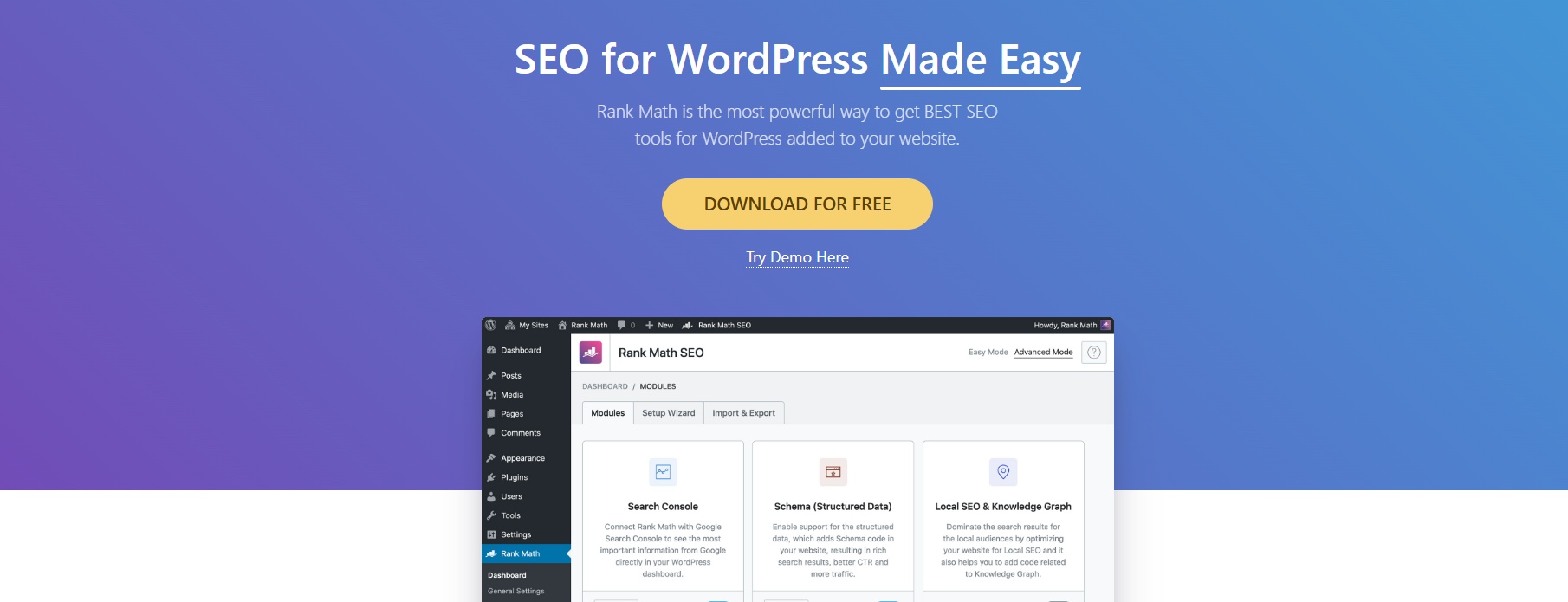
Rank Math SEO 

Rank Math SEO

Rank Math is already one of the most popular SEO plugins. Its new AI features help you write optimized titles, meta descriptions, and even full blog posts. It also gives real-time SEO suggestions to improve your rankings.
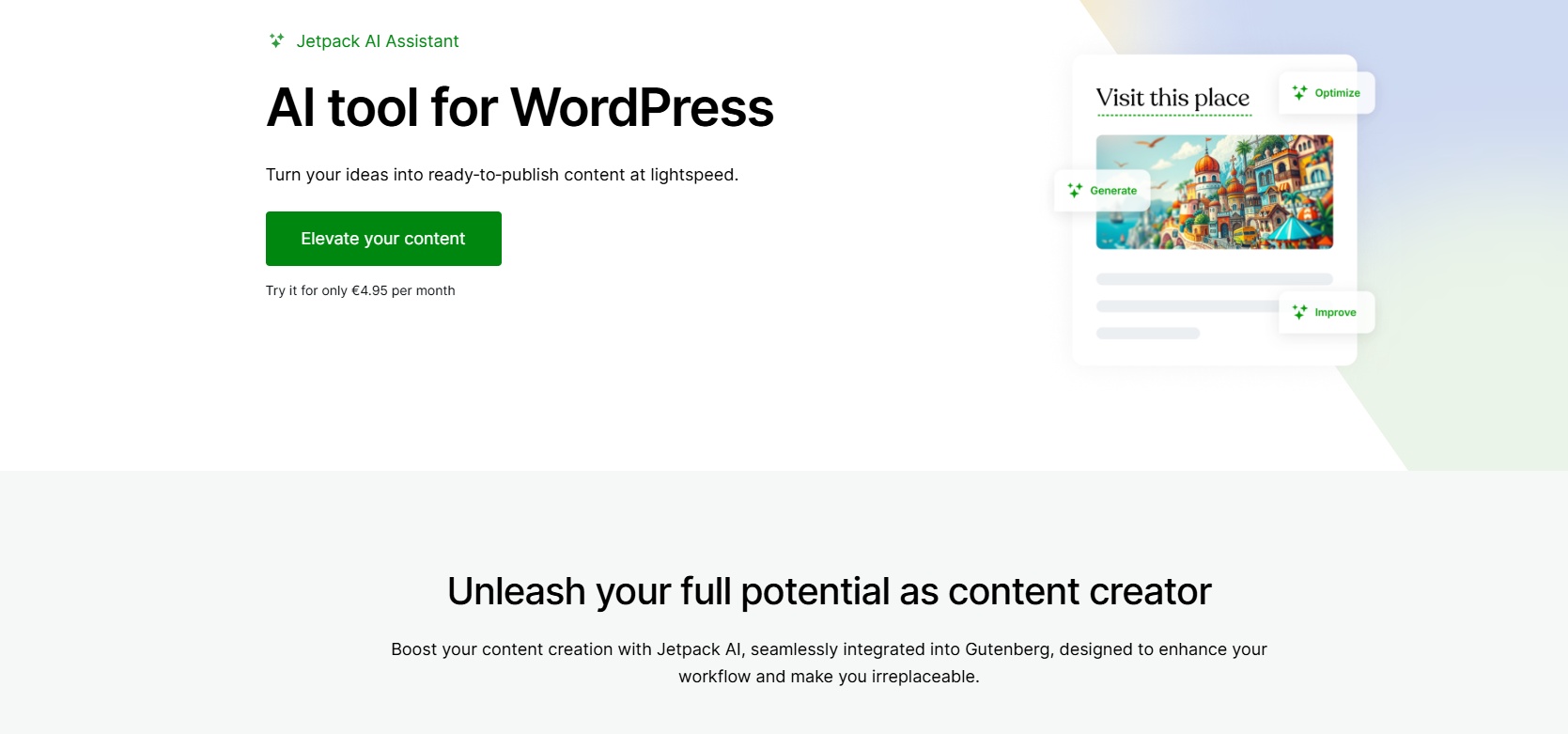
  • Best For: Bloggers and content creators.
  • Key Features: AI title & description generator, keyword suggestions, on-page SEO optimization.


Jetpack AI Assistant


Jetpack AI

Jetpack is a well-known plugin that now includes an AI assistant. It can create and edit content, suggest improvements, and speed up writing workflows directly in the WordPress editor.
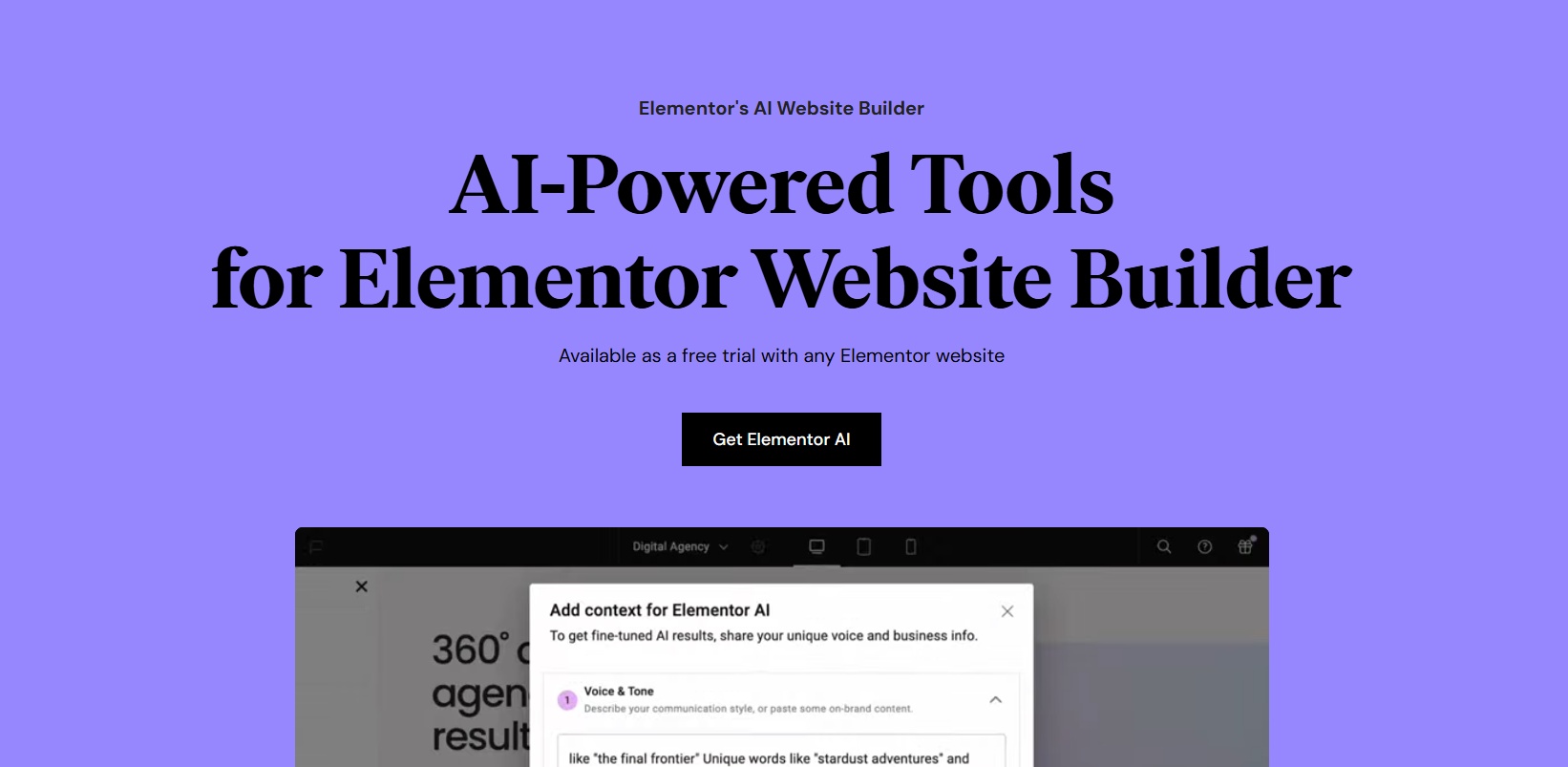
  • Best For: Writers and website owners who publish often.
  • Key Features: Content creation, editing support, quick formatting.


Elementor AI

Elementor AI

Elementor is a leading page builder, and its AI integration makes designing even easier. You can generate text, translate content, and improve writing without leaving the editor.

  • Best For: Designers and businesses building custom pages.
  • Key Features: AI text generator, translation, style suggestions.

AI Engine

AI Engine

AI Engine is a flexible plugin that connects your site with OpenAI’s GPT models. You can build your own chatbot, generate content, and even run AI-powered image creation.

  • Best For: Advanced users who want more customization.
  • Key Features: Chatbot builder, text generation, image creation, API integrations.


How to Choose the Right AI Plugin for Your Website

When picking an AI plugin, keep these points in mind:

  • Your Goals: Do you need better SEO, faster content writing, or smarter design?
  • Budget: Some plugins are free, while others require subscriptions or credits.
  • Ease of Use: Beginners may prefer simple built-in AI tools, while advanced users can explore customizable options.
  • Compatibility: Make sure the plugin works well with your theme and other plugins.

Choosing the right AI plugin depends on your specific workflow and the problems you want to solve. If your focus is on visual design and creativity, a tool like Depicter can be a great start since it combines AI-powered visuals with an intuitive editor. On the other hand, if writing or SEO is your main goal, plugins like Rank Math AI or Jetpack AI Assistant may fit better. It’s often best to start with one plugin, test it for a few weeks, and then decide whether to expand your setup.

Common Mistakes to Avoid

  • Installing Too Many AI Plugins: This can slow down your site and cause conflicts.
  • Ignoring Website Speed: Some AI features rely on external APIs, which may affect performance.
  • Relying Fully on AI: AI is great, but human editing is still necessary for quality and accuracy.

While AI can dramatically improve your workflow, balance is key. Don’t expect plugins to do all the creative or strategic thinking for you use them as assistants, not replacements. It’s also smart to monitor your site’s performance after adding AI tools and disable the ones you don’t use often. 


FAQs

What makes Depicter’s AI Slider Builder unique?

Depicter stands out because its AI can analyze your content and automatically design sliders that match your website’s style. It doesn’t just generate random layouts it suggests animations, transitions, and colors that feel cohesive and professional. Plus, with the built-in AI Background Remover, you can clean up images directly in the editor, saving tons of editing time.

Do I need design experience to use AI plugins like Depicter?


Not at all. Most AI-powered tools, including Depicter, are designed for users with any skill level. You simply describe what you want, and the AI handles the creative process from layout to animation. It’s a great way to achieve professional-quality results without hiring a designer.

Are AI plugins compatible with all WordPress themes?


Most well-built AI plugins are compatible with modern themes, but it’s always smart to test them on a staging site before activating them on your live site. Depicter, for example, works smoothly with most WordPress themes and builders.

Are AI plugins safe for WordPress?


Yes, most popular AI plugins are safe, as long as they come from trusted developers. Always install from official sources like WordPress.org and keep them updated to ensure security.

Do AI plugins slow down websites?


Some can if they’re not optimized or if too many are running at once. However, tools like Depicter are lightweight and well-optimized, so they won’t noticeably affect your site’s loading speed.

Can AI replace manual content writing and design?


Not completely. AI can generate ideas, drafts, and layouts, but human review and creativity are still important. The best results come from combining AI speed with human judgment.


Conclusion

AI plugins are transforming how we build and manage WordPress websites. They simplify complex tasks, speed up workflows, and help you deliver a more professional user experience even if you’re working solo.


Depicter stands out as a powerful, all-in-one design assistant. Its AI Slider Builder lets you create visually striking sliders and hero sections in minutes. It’s a perfect example of how AI can make web design both faster and more creative.

Let me know what other great AI plugins you know in the comments.
WordPress ACF and the Best CPT Plugins (1)

WordPress ACF and the Best CPT Plugins

What Are WordPress Custom Post Types

WordPress comes equipped with a few standard content types—Posts, Pages, Attachments, and some internal types like Revisions and Menus. These default post types are designed to cover the most common needs of a basic website. However, many websites require more specialized content structures that go beyond blog posts or static pages.


That’s where Custom Post Types (CPTs) come into play. A custom post type is a tailor-made content type that functions much like a regular post or page but is designed to fit a specific purpose. Whether you’re building a property listing website, a recipe collection, an event calendar, or a product catalog, custom post types allow you to create and manage content that matches your site’s unique needs.

What Can You Do With Custom Post Types

With custom post types, you can define your own fields, taxonomies, and admin interface. For example:


  • A “Recipe” CPT could include fields such as Ingredients, Cooking Time, and Difficulty.
  • A “Portfolio” CPT might have fields like Client Name, Project Description, and Image Gallery.
  • A “Job Listing” CPT could hold data like Job Title, Location, Salary, and Application Instructions.


Not only do custom post types improve how content is organized and displayed, but they also enhance your site’s usability and SEO. By creating distinct sections in the WordPress dashboard for different content types, CPTs make content management more intuitive and user-friendly.


Many people in the WordPress community often confuse ACF (Advanced Custom Fields) with custom post types or use the terms interchangeably. This confusion happens because ACF frequently works alongside CPTs and has become one of the most popular plugins for extending them.


For example, you might hear someone mention:


  • ACF Slider – a custom post type for image sliders enhanced with custom fields via ACF.
  • ACF Custom Post – a general reference to a CPT that uses ACF fields for additional data.
  • ACF Testimonials – a testimonial post type structured with custom ACF fields like author name, quote, and company.


In practice, ACF and custom post types are a powerful duo for building dynamic, structured content in WordPress without writing complex code.


This article briefly introduces the top and most popular plugins for working with Custom Post Types.
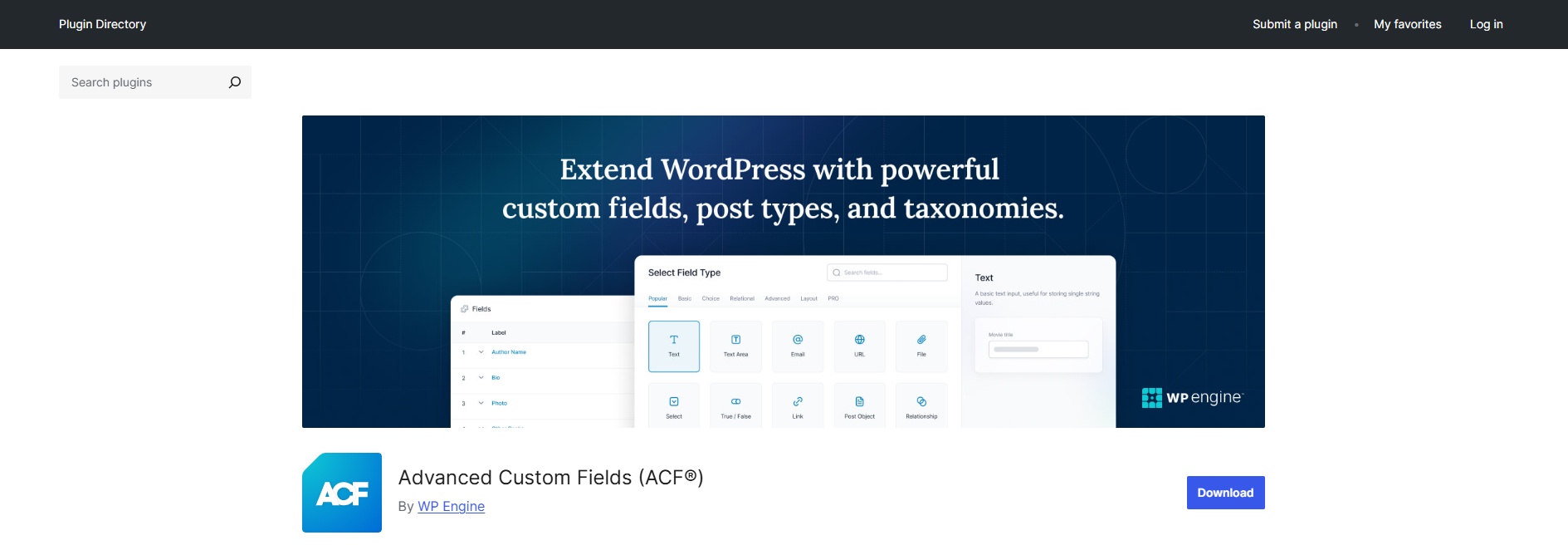
 

Advanced Custom Fields (ACF)

Advanced Custom Fields Banner

Advanced Custom Fields (ACF) is a popular WordPress plugin that makes it easy to add custom fields and, more recently, custom post types (CPTs) to your site without needing extra tools. After its acquisition by WP Engine, ACF introduced built-in CPT support along with a refreshed interface. With over 30 field types available, it lets users place custom fields across posts, pages, users, media, and more. Its user-friendly design, support for conditional logic, and compatibility with most themes and plugins have made it a go-to choice for developers and content creators looking to build flexible, structured websites.
 

Custom Post Type UI (CPT UI)

CPT UI Banner


Custom Post Type UI is a widely used and reliable WordPress plugin designed to help users create and manage custom post types and taxonomies through a clean and intuitive interface. It simplifies the process of setting up new content structures, making it accessible even to those without coding experience. Originally popular for its compatibility with ACF—especially at a time when ACF lacked native support for editing post types—this plugin has maintained its reputation for being a practical and efficient solution. It also offers import and export functionality, allowing users to transfer custom post types across different websites, which is particularly useful for managing content at scale. Thanks to its user-friendly design and flexible features, Custom Post Type UI remains a top choice for WordPress users looking to extend their site’s content organization capabilities.
 

Pods – Custom Content Types and Fields

Pods Banner


Pods is a flexible and developer-focused WordPress plugin that goes far beyond simply creating custom post types. As a complete content framework, it allows users to build and manage custom post types, taxonomies, fields, user roles, and relationships—all within a unified interface. Its templating capabilities and shortcode support make it easy to display custom content without needing additional page builders. What sets Pods apart is its modular structure and advanced features, such as storing data in separate database tables for performance optimization and linking complex relationships across post types, users, or even external database objects. While it offers extensive functionality, the plugin is more suited to experienced users due to its steeper learning curve and somewhat cluttered interface.
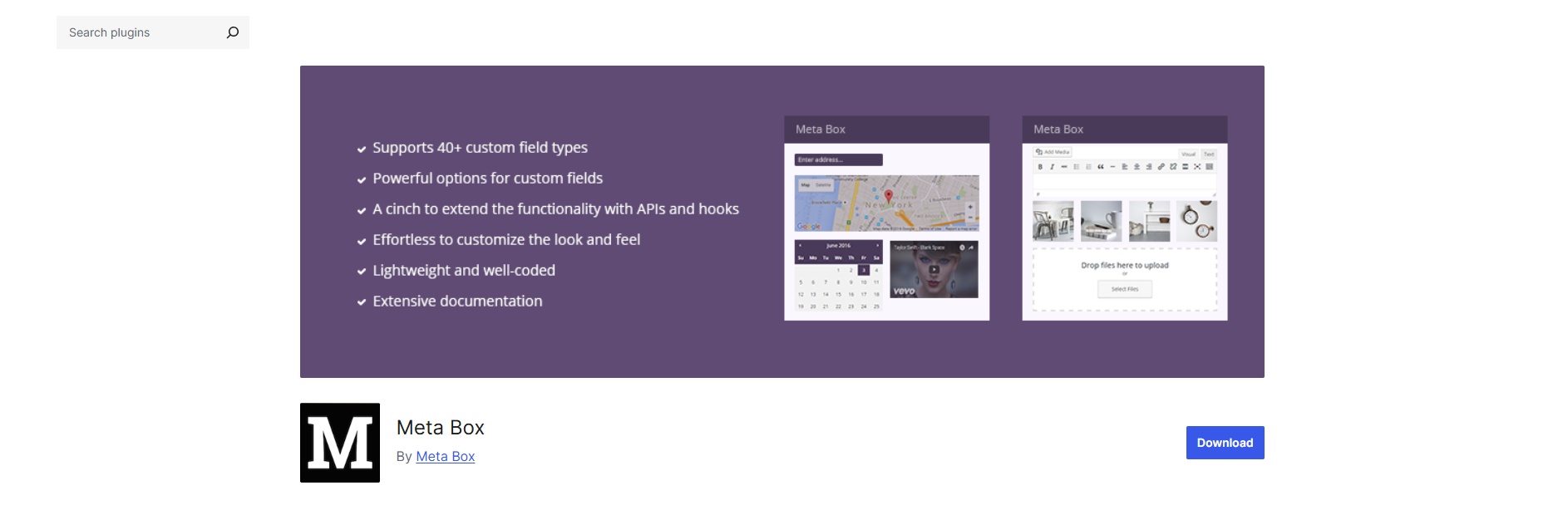
 

Meta Box

Meta Box Banner

Meta Box is a powerful and modular WordPress plugin designed for developers who want to create highly customized websites using custom fields, post types, and taxonomies. Although Meta Box includes a free version, users unlock its full potential by upgrading to the Pro extensions, which offer advanced tools for building dynamic content structures. Despite the developers’ claims of beginner-friendliness, the plugin primarily serves users with coding experience. Features like exporting CPTs as PHP, integrating with Twig, or working with custom database tables require custom code to use effectively. Meta Box supports over 40 custom field types and integrates with popular builders like Elementor and Beaver Builder, offering flexibility and performance in one lightweight package. Its modular system allows users to activate only the needed components, making it an efficient solution for developers building scalable and tailored WordPress projects.
 

JetEngine

Jet Engine Banner

JetEngine is an all-in-one solution for building dynamic, database-driven WordPress websites that go far beyond just registering custom post types. Designed with flexibility and scalability in mind, it offers an extensive suite of tools for creating CPTs, custom fields, taxonomies, and more—all from a single, intuitive interface.

Unlike more minimal plugins, JetEngine includes advanced modules. It support for Custom Content Types (CCTs) that operate outside the standard WordPress tables, and seamless integration with builders like Elementor, Gutenberg, and Bricks. It’s fully compatible with other plugins like ACF, Pods, and CPT UI, making it ideal for projects that require advanced structure without custom coding.

1

Best WordPress Testimonial Slider

What’s a testimonial?

Want to build trust for your website? Learn how to create strong testimonials that connect with your audience and show what your products or services offer. The right approach helps you get real, persuasive testimonials that stick with your website visitors.


One common way to show social proof is through testimonials from past customers. A testimonial slider is a great way to display them.

A testimonial is usually a section of your website with comments from happy customers who’ve used your service or bought your product. Often, it’s shown in a rotating slider to save space.


Why have testimonials on your website?


Customer opinions are really influential in content marketing.

There’s a psychological reason for this. When someone visits your website, they often look for proof of positive experiences from past users and buyers.

Good experiences from past customers and the quality of your service build your credibility.

When users honestly share how good your service is, it can be a powerful way to get new customers. So, adding a testimonial section to your website is a good idea. Let’s learn how to create a testimonial slider for your website


How to add a testimonial to your WordPress website using the Depicter?

To do this, we’ll use the Depicter plugin.

Install the Depicter plugin
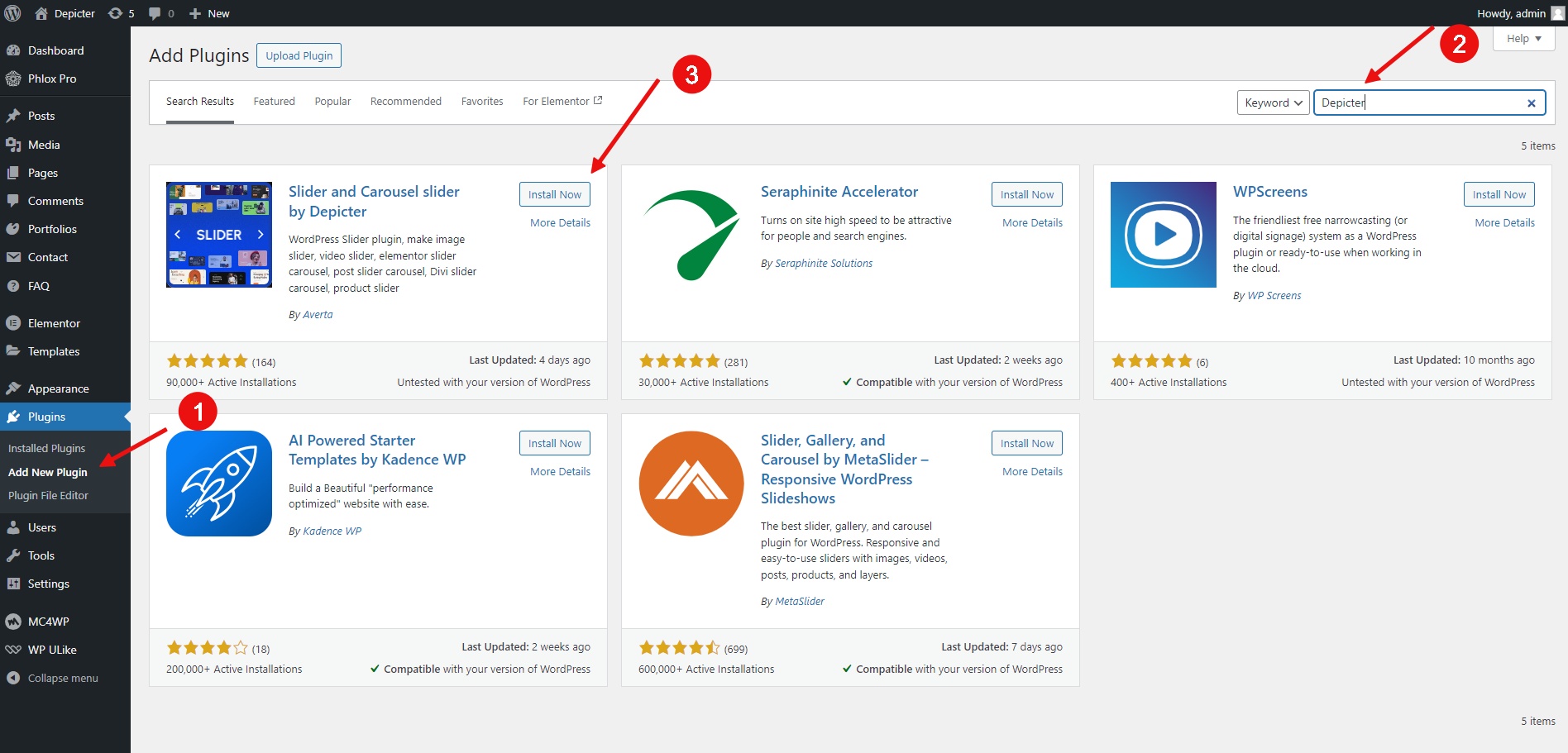
  • Go to the Plugins menu.
  • Click Add New Plugin.
  • Search for Depicter.
  • Click Install and then Activate.


Importing a testimonial template

This is our website before placing a testimonial on its front page, and in the highlighted spot, we’re going to create and place a testimonial.

 

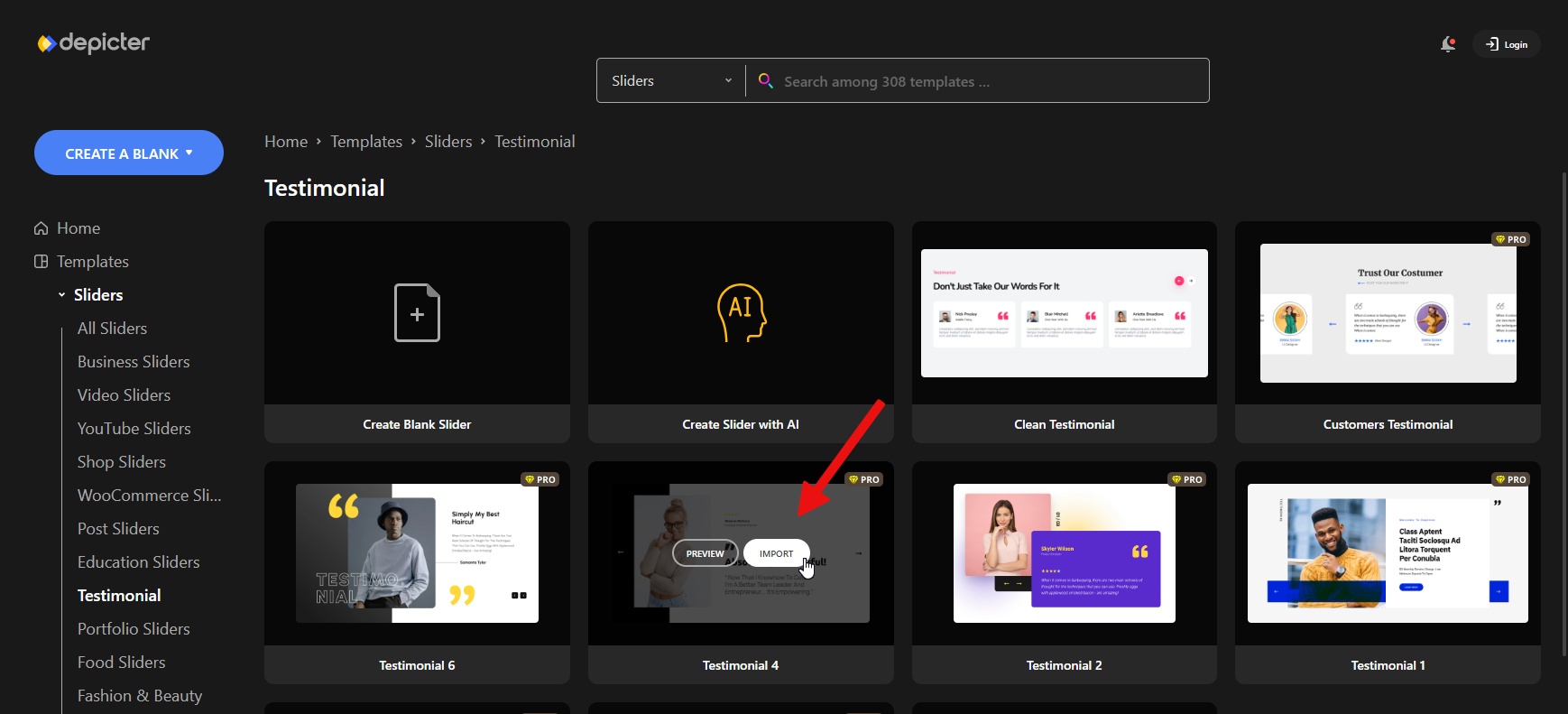
After installing Depicter, we go to the dashboard and click on the ‘Testimonial’ option in the template menu.
Here, we want to import a ready-made template from Depicter’s extensive collection of templates to speed up our work.
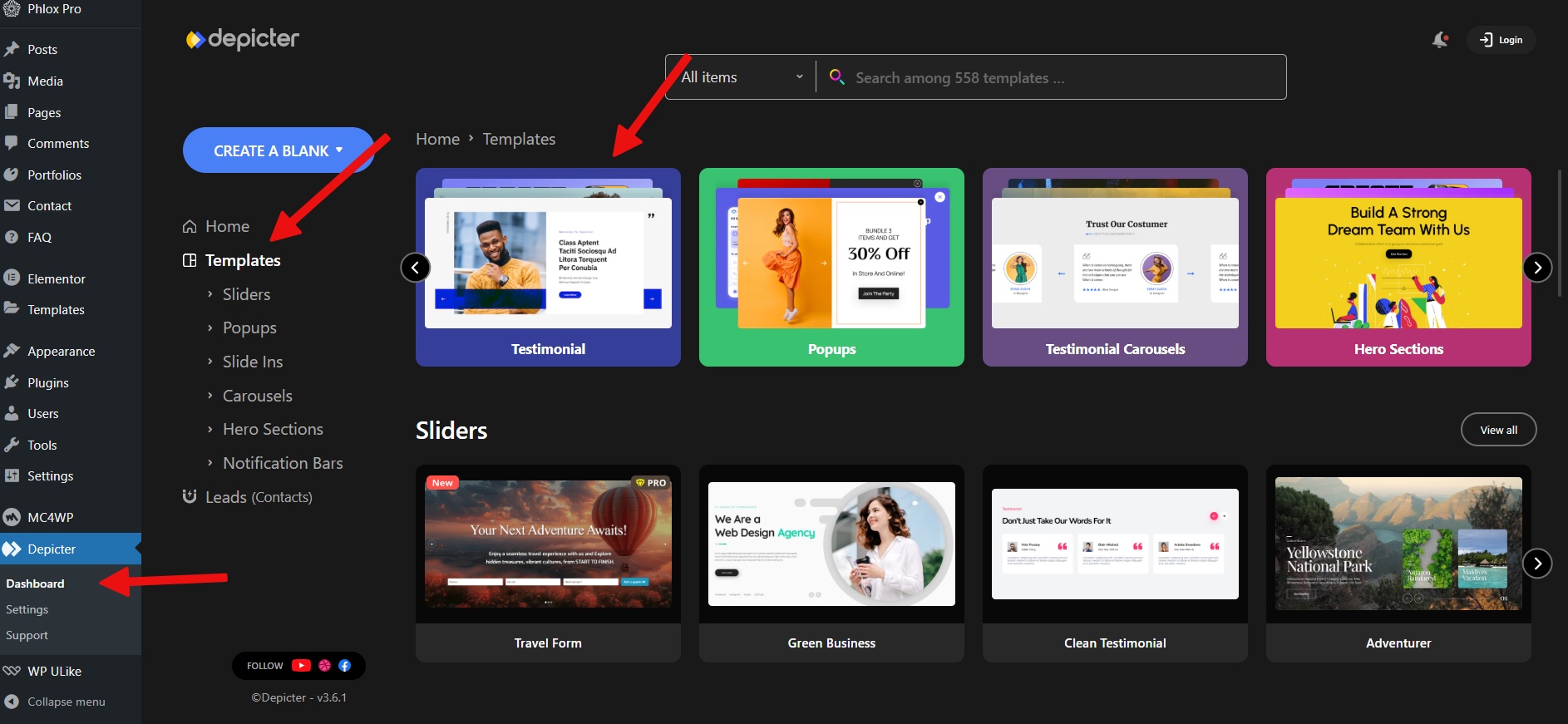
After entering the Testimonial section, we can import an option from among the ready-made templates by clicking on the import button.
 

After a few seconds, the testimonial is imported and is available to us in the Depicter editor. Here, using the options that Depicter provides us, we can customize the display and style of the testimonial. 
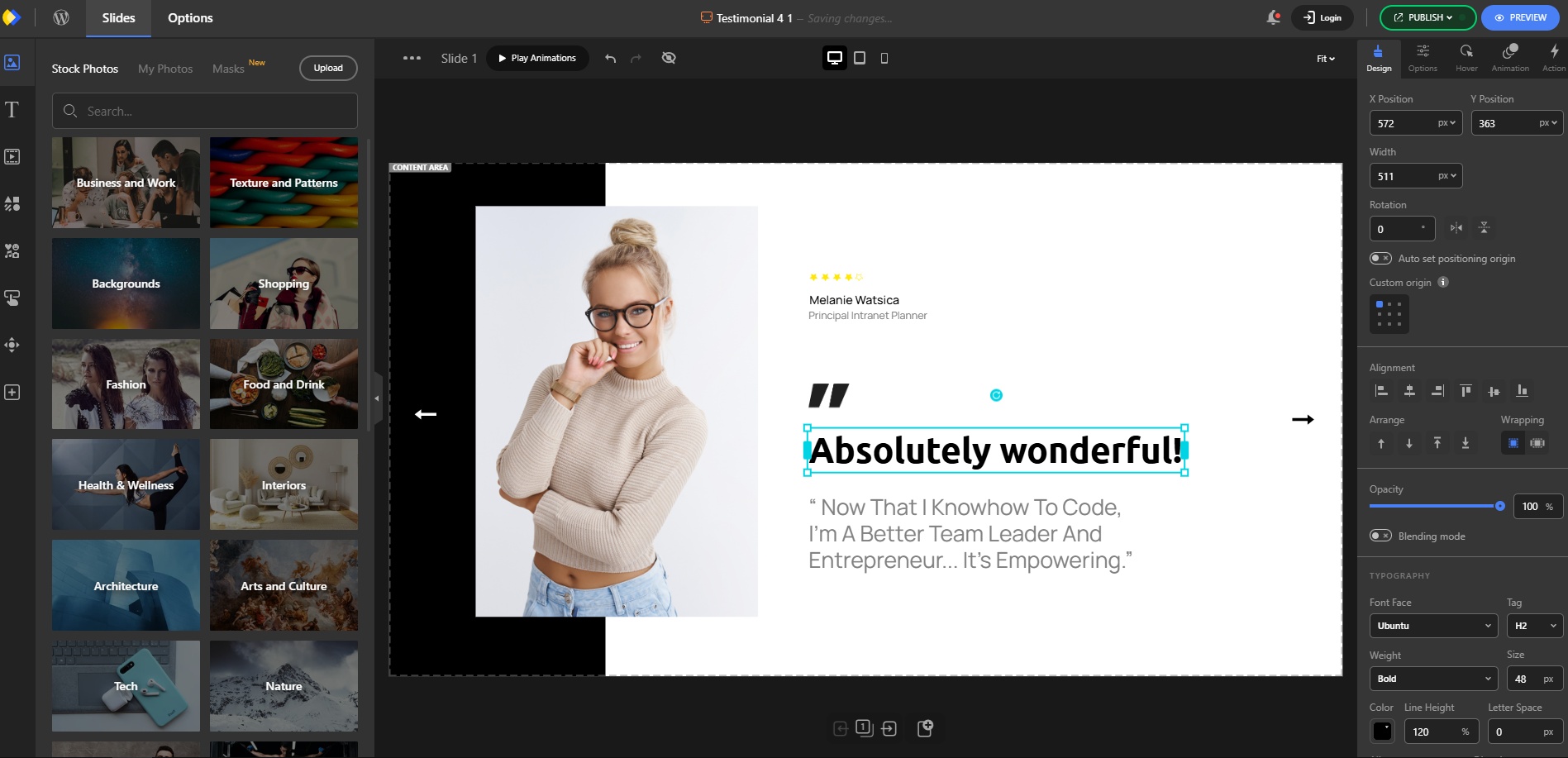


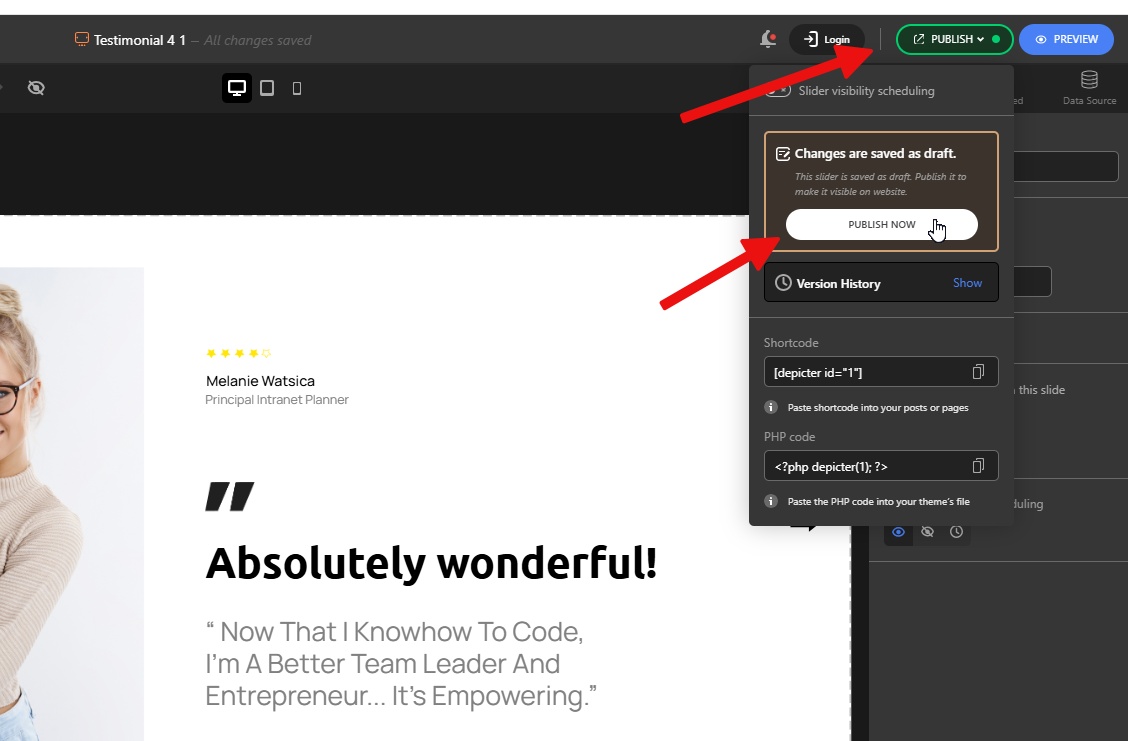
After making the changes, we need to save the testimonial, which we do by clicking on the publish button.


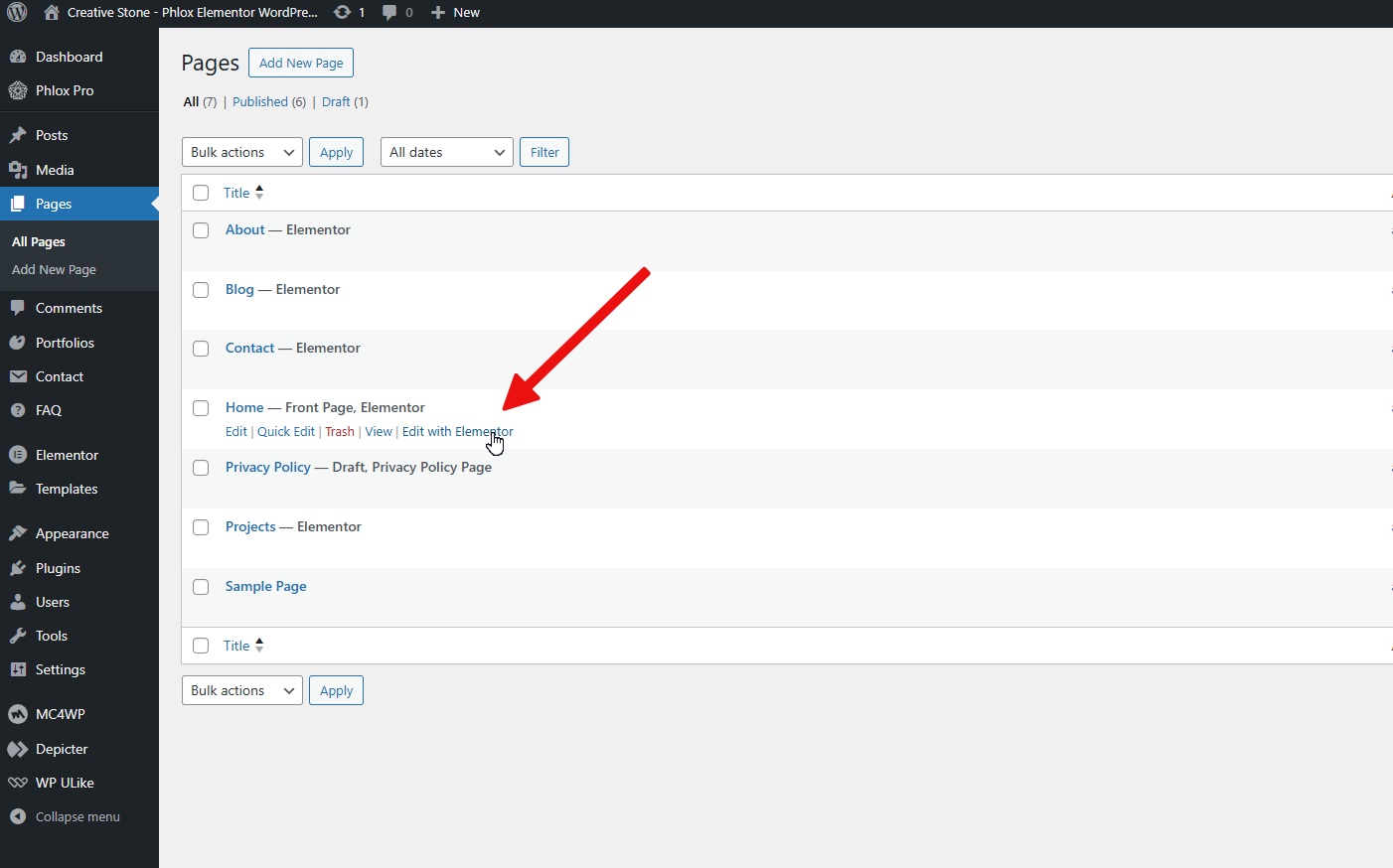
Finally, we must add the testimonial to our page. Depicter is compatible with all the popular WordPress page builders and has no limitations in this area. In this case, our website is built with Elementor.
 

So we open our page in Elementor and drag the Depicter widget to the page.
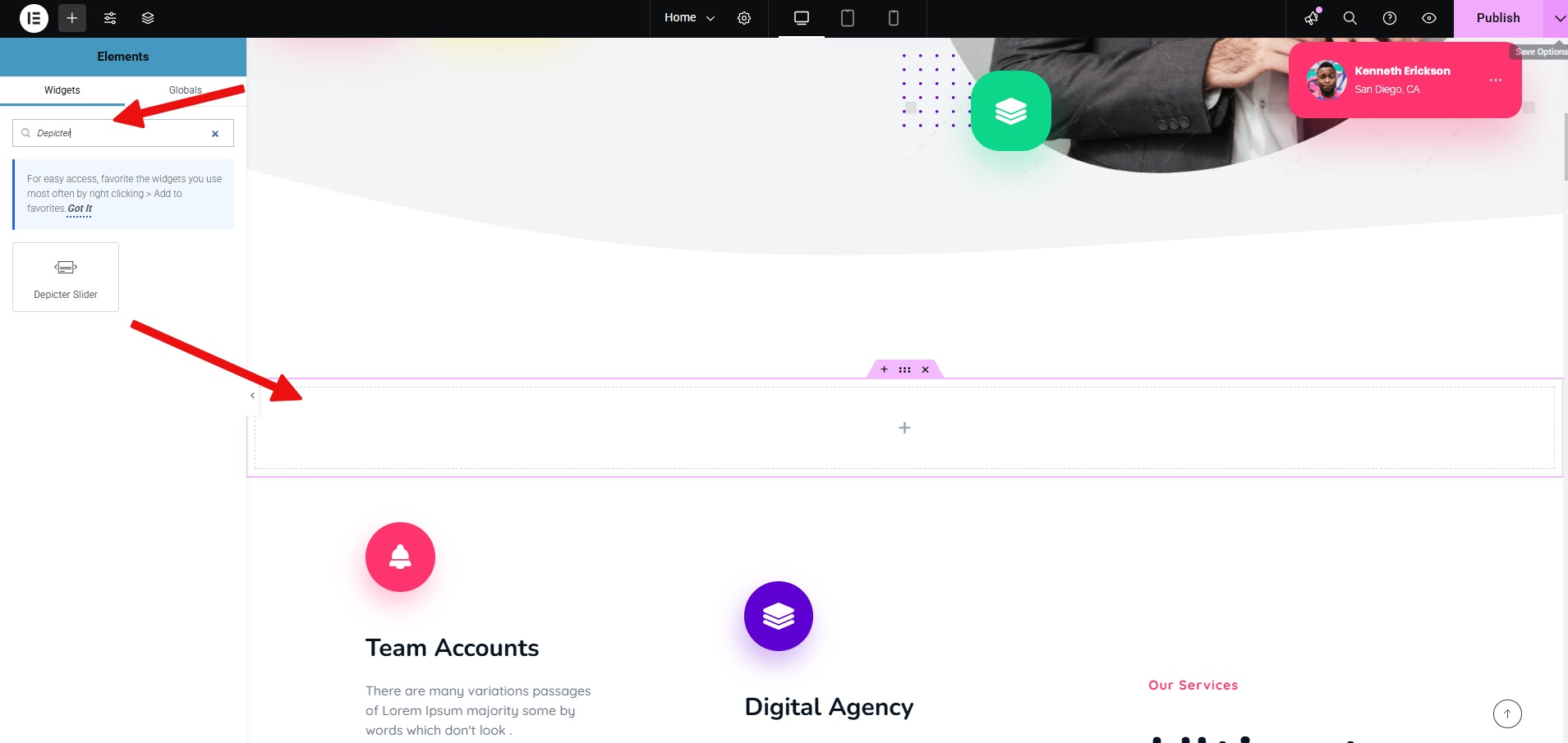


In the next step, we select our testimonial from the list and then save the page changes.
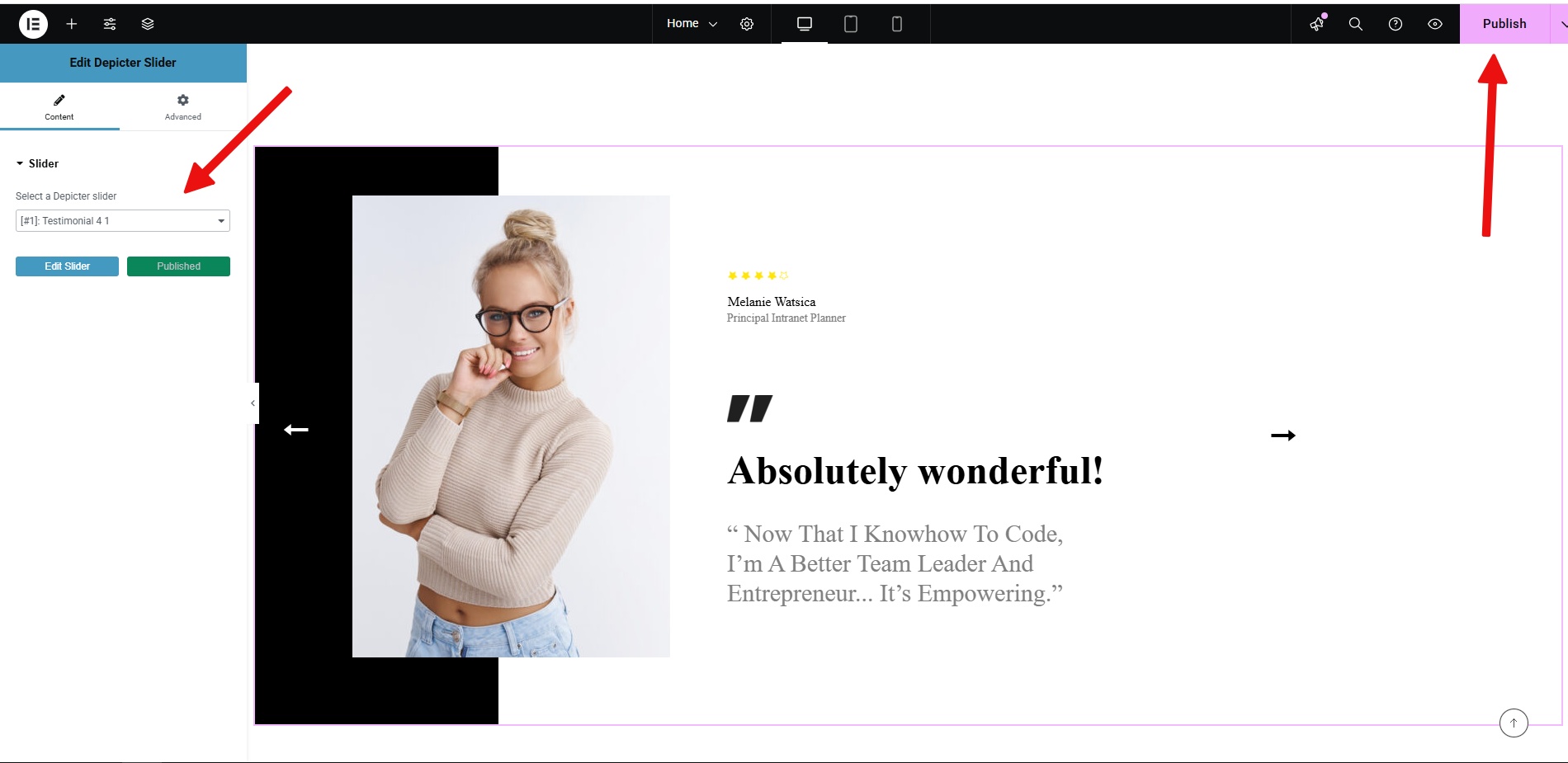


The work is finished, and the final result on our website will be like this.

 

Conclusion

Adding testimonials to your WordPress site can boost your credibility and attract new customers. Using a plugin like Depicter makes the process straightforward, even if you’re not a tech expert. It offers pre-designed templates and integrates with popular page builders, letting you quickly create and customize the testimonial slider that fits your site’s design. This can be a simple but effective way to showcase positive customer feedback and build trust with your audience.

How to Grow Your Email List-min

How to Grow Your Email List

Let’s talk about email lists. They’re really useful for any business. They’re a key part of email marketing, giving you a direct line to people interested in what you offer.

Social media followers and people you reach through ads are different. With your own list, you get better results because you’re talking to people who chose to hear from you. This helps you build real relationships with your customers.

Your email list is a great way to boost sales, find new customers, and make people stick with your brand.

So, whether you’re just starting out or already have a list and want to make it bigger, having good strategies for building that list is essential if you want your business to grow.


There are various strategies to grow your email list, such as:

  • Promote newsletter sign-ups on your social media channels.
  • Include a newsletter signup link in your email signature.
  • Feature a prominent newsletter signup button in your email campaigns.
  • Run a contest or giveaway to collect newsletter sign-ups.
  • Provide valuable content (like an ebook or checklist) in exchange for newsletter sign-ups.
  • Create an engaging quiz to capture leads and newsletter sign-ups.
  • Host webinars to build your audience and collect newsletter sign-ups.
  • Integrate newsletter signup forms across your website.
  • Run a challenge or program to engage your audience and drive newsletter subscriptions.
  • Expand your reach and gain subscribers by guest blogging or contributing to other newsletters.

Each of these strategies has its own details and methods. In this article, we will discuss one of the most effective of these methods, which is growing the email list via Popups using the Depicter plugin.

Installing Depicter:

  1. Access Plugins: In your WordPress dashboard, navigate to the “Plugins” section.
  2. Install Depicter: Click “Add New,” search for “Depicter,” and click “Install Now.”
  3. Activate: Activate the Depicter plugin after installation.

Here is the video tutorial for this process:

Creating Your First Popup:

Open Depicter Dashboard: After activating Depicter, access its dashboard and go to Templates > Popups

Select a Template: Choose a pre-designed popup template from the available options. 

Preview templates by clicking “Preview” before importing. Click “Import” to add the selected template to the Depicter editor for customization. There is a specific category of Popups for this called “Grow Email list” that you can use.
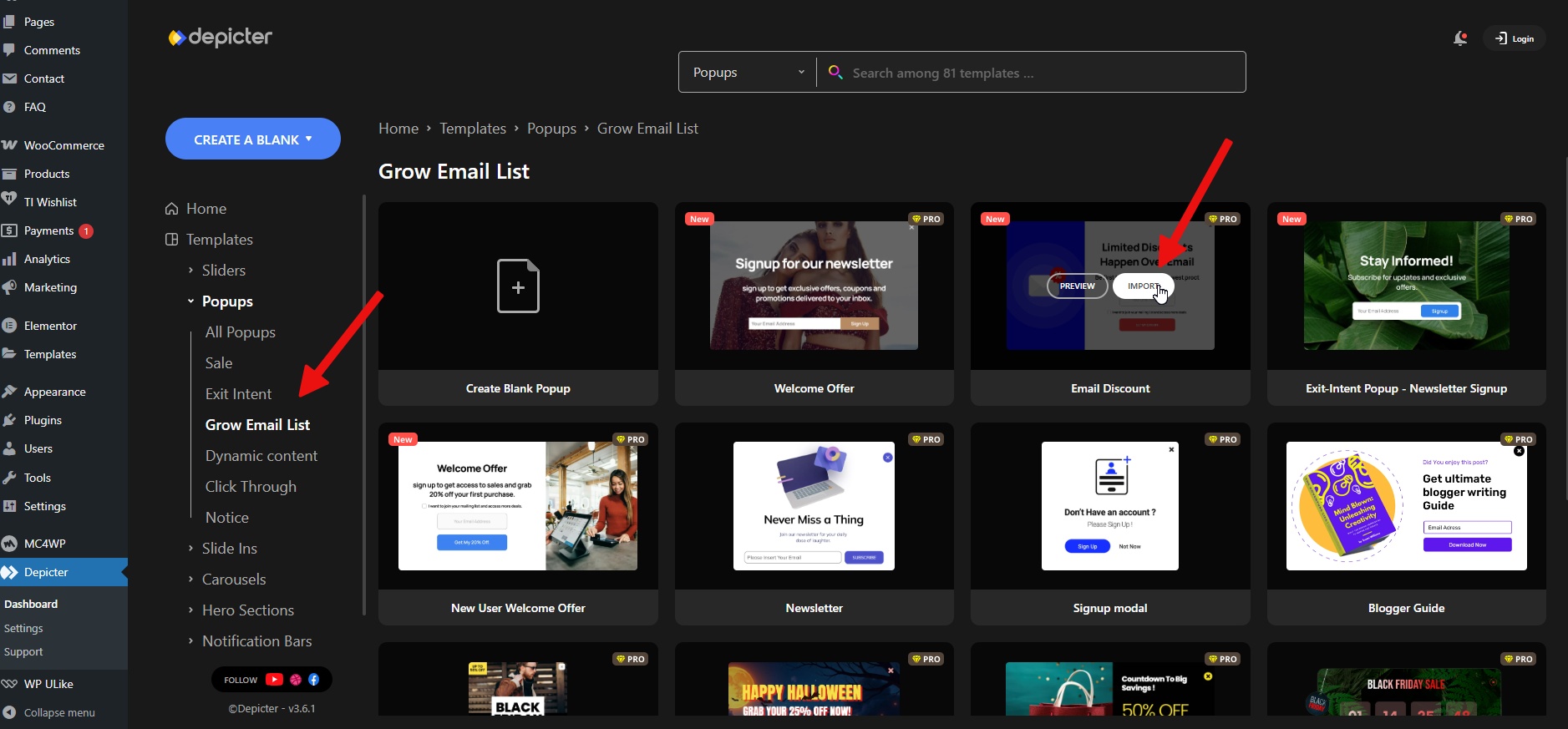
 

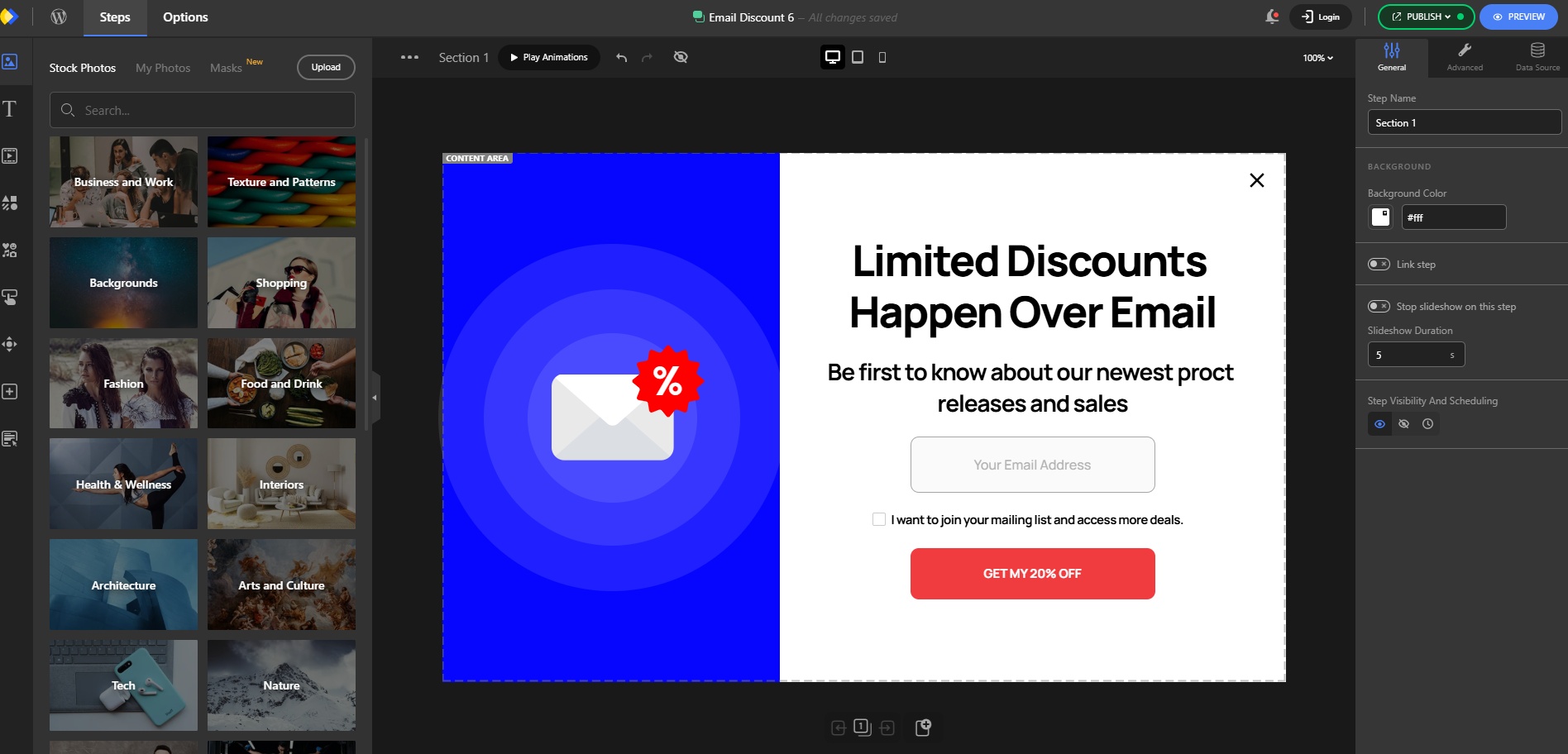
Your chosen template is now imported and ready to be customized. Use Depicter’s tools to make any desired changes. For a detailed walkthrough, watch this video.


Customizing and Configuring Your Popup

After the import is complete, you’ll enter the Depicter Popup Builder. Here, you can adjust the style and other settings for the popup. Depicter has specific options for each element and part of the popup’s details. You can personalize these by simply selecting the element and going to the options panel.
 

Next, we need to specify where and under what conditions our popup will appear. We do this in the Display Conditions section:
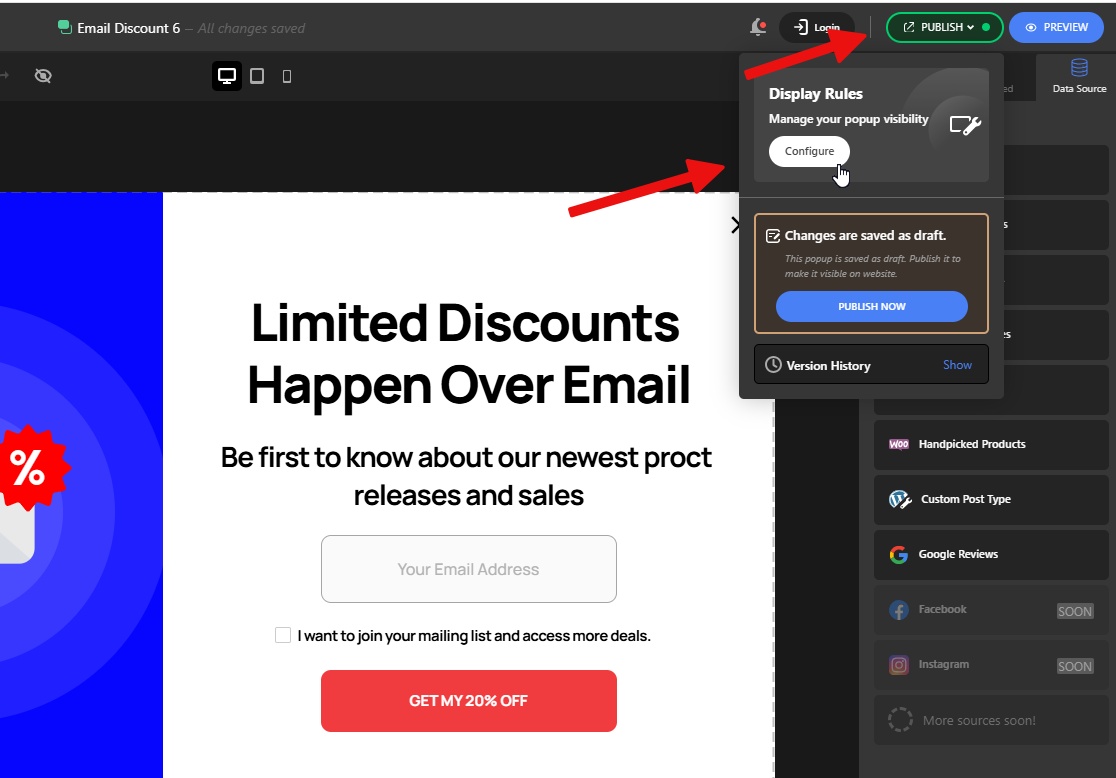
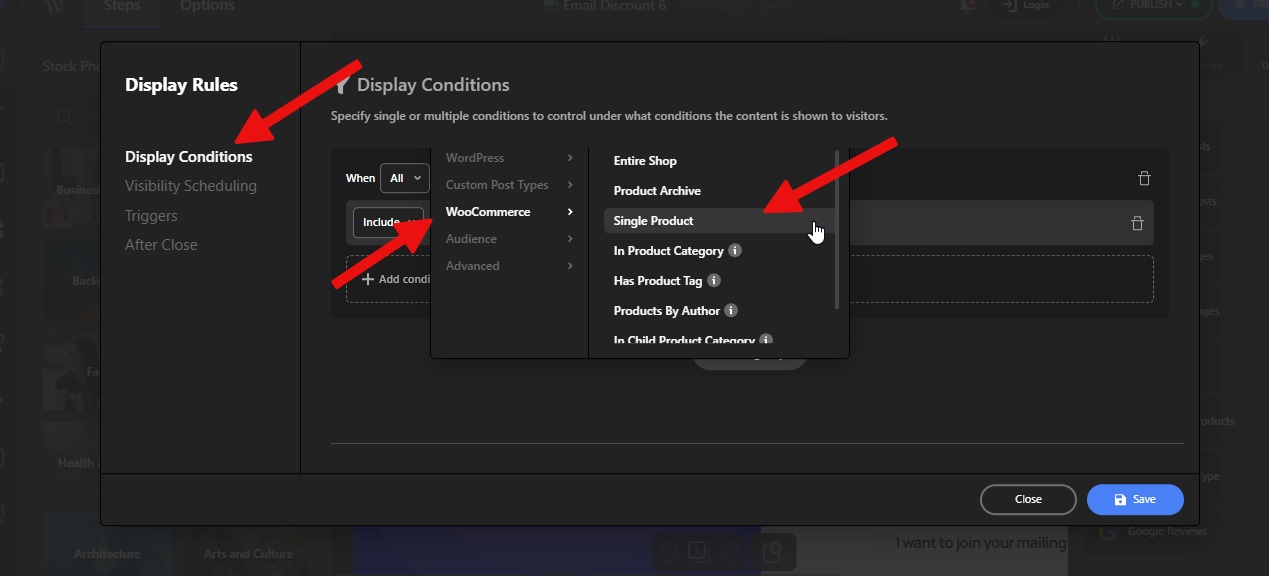
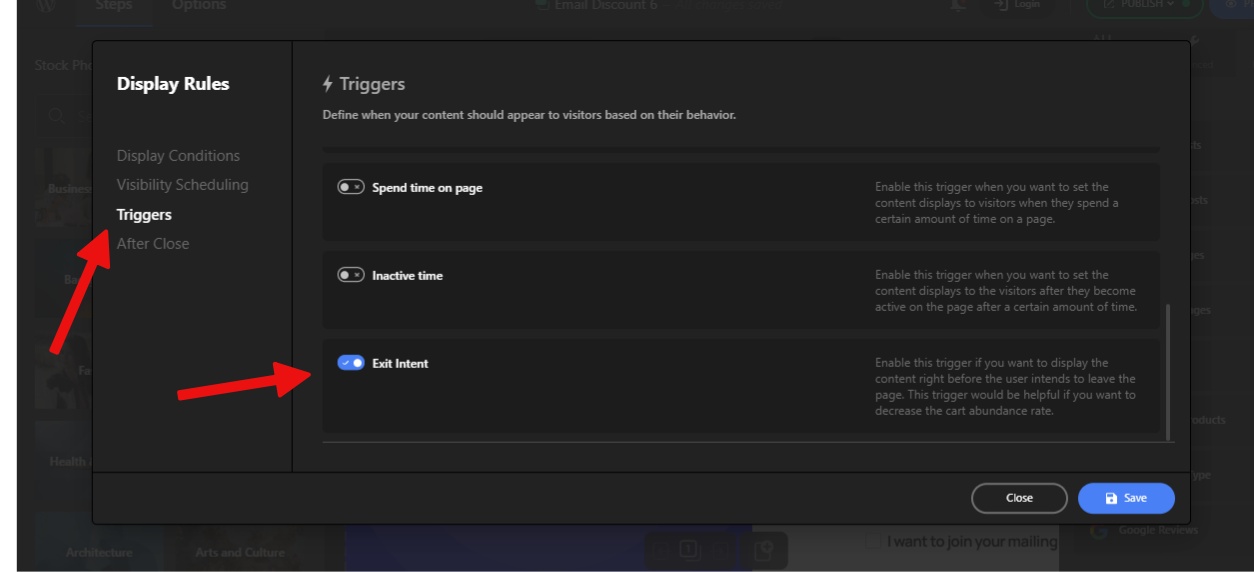
Depicter, with its various options for displaying the Popup in the right place and time, allows you to customize these settings however you like. Here we want our Popup to be displayed on the Single Product Page and when the user is leaving this page. This type of display is also called “Exit Intent“.

First, from the Display Conditions section, select WooCommerce and then Single Product.
And then from the Triggers section, select the Exit Intent option, then click the Save and finally Publish button.
Here our work is done.

Now, whenever a visitor opens a Single Product Page, this popup will be displayed when they exit the page, and they can enter their email in the designated field to receive a special offer.
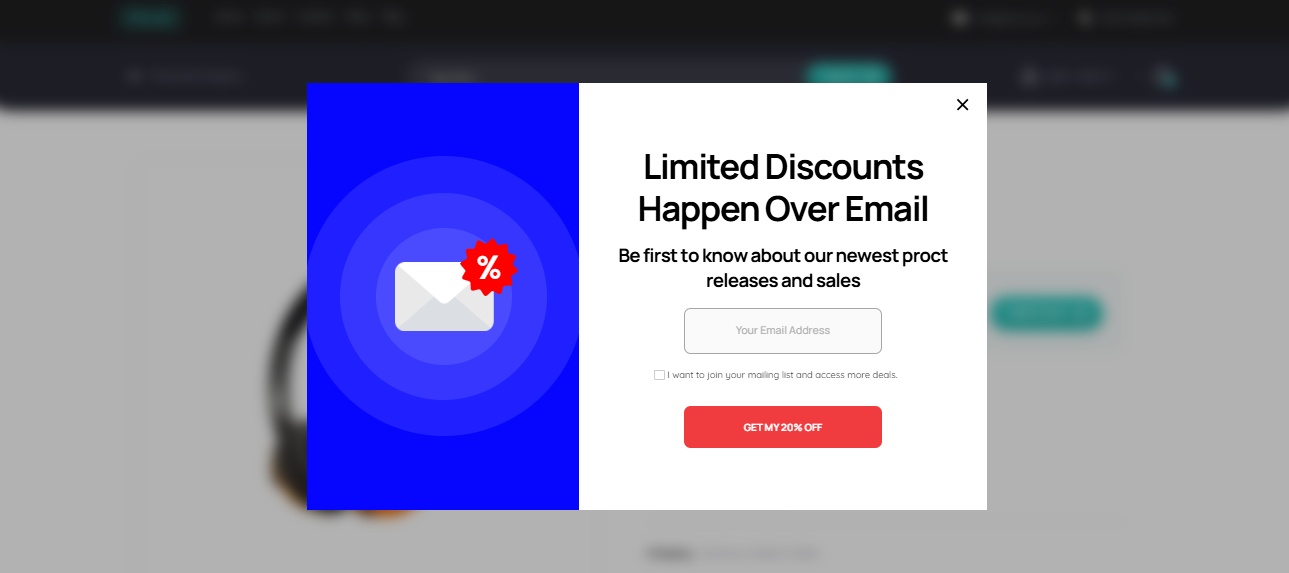
 

Collecting and Managing Email Data

When a user submits the form, they’ll see a confirmation message.
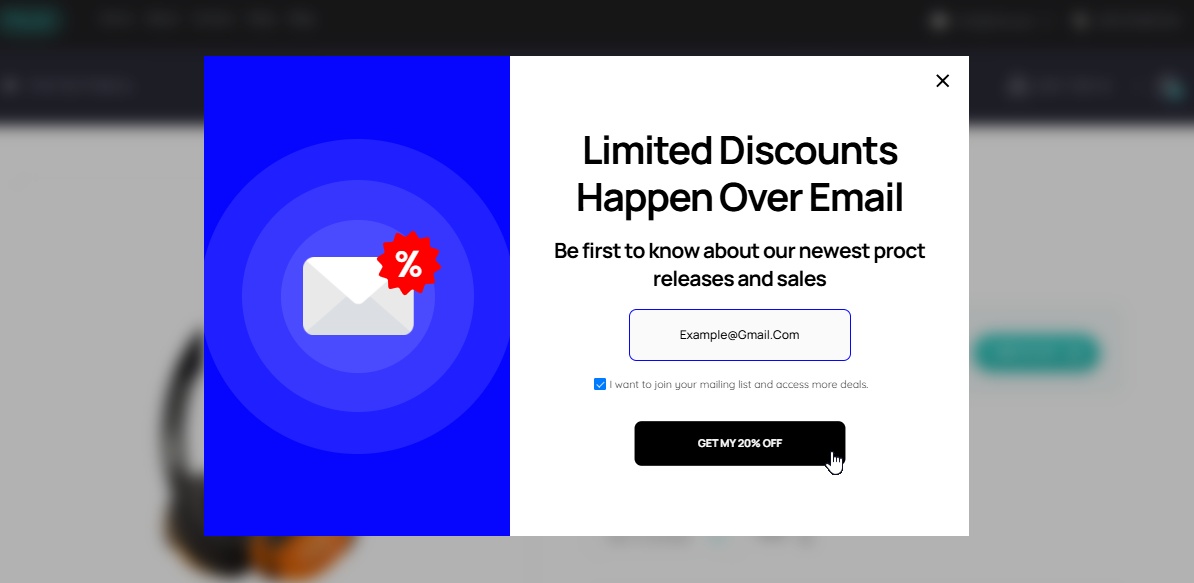

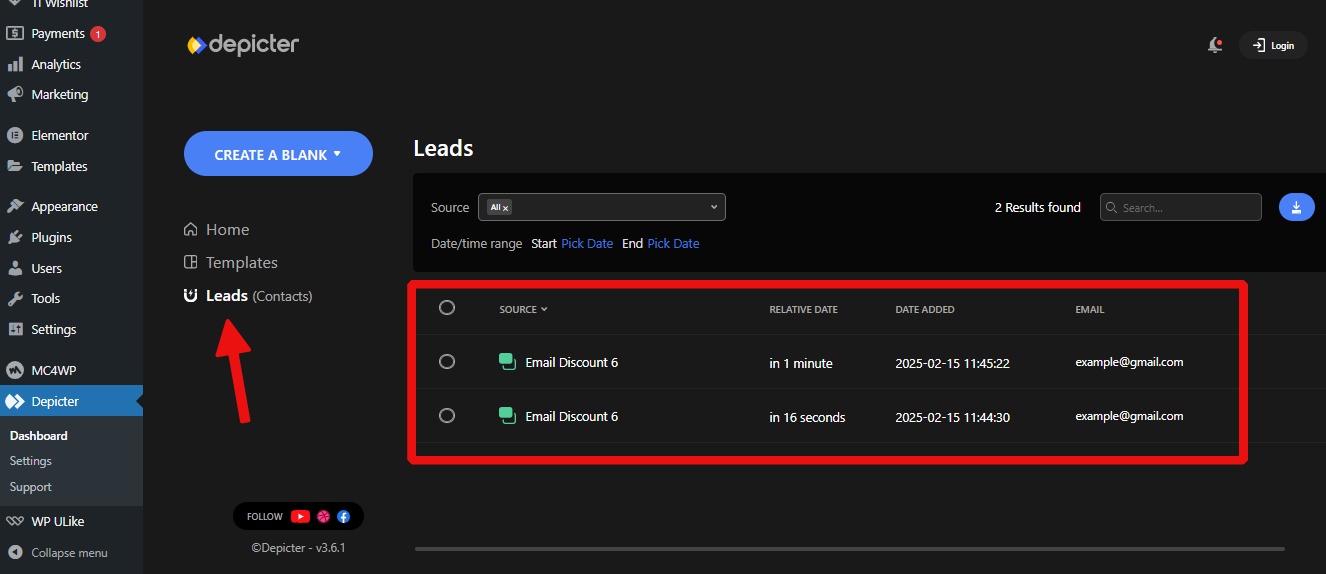
To access the collected data, go to the “Leads” menu in the Depicter dashboard.

Here, you can view, filter, search, and export the submitted information as a CSV file for email marketing or other purposes.
Conclusion

This guide demonstrated how to use Depicter to create popups and collect email addresses, a valuable tool for growing your email list and increasing sales. It covered understanding your customers, designing effective popups, and tracking results.

Best Wordpress Black Firday deals Phlox

Best WordPress Black Friday Deals (2024)

Black Friday and Cyber Monday are the perfect opportunities to supercharge your WordPress website with incredible deals on premium themes, plugins, and services. With so many options out there, it can be tough to find the best deals.

That’s why we’ve curated a list of top WordPress Black Friday and Cyber Monday offers to help you save big. Whether you’re a seasoned WordPress pro or just starting out, these deals will help you take your website to the next level.

Get ready to explore the best WordPress deals of the year.

Also, don’t forget to check out Best WordPress Halloween deals. You don’t wnat to miss that.


Featured Deals

900x475@2x

Phlox

Featured
Phlox is the best Elementor multipurpose theme with over 100,000 active installations. It has more than 250+ Complete Elementor demos that can be imported in 3 clicks and edited on Elementor. Simply find any templates you like, import it, replace the images and text with yours and it is done. If you are looking for a professional design Phlox would be a perfect option with 45000+ sales on ThemeForest!
Coupon code: Auto-applied Save 30%
Validity: November 19 to December 3
Discount: 30% Off
Get The Deal
wpdone-banner-black-friday-3

WPDone

Featured
Built by Artbees, WPDone is a white-label custom development service for WordPress and WooCommerce offering a variety of solutions to meet specific client needs in areas such as Custom WP & Woo Development, Converting Design to WP, Theme Customization, Security & Performance Optimization, and Custom Design. Short Desc: Elevate your WP and WooCommerce projects with expert development, customization and optimization services.
Coupon code: BF2024 Save 30%
Validity: November 20 to December 03
Get The Deal
Screenshot 2024-11-28 11.12.56

InstaWP

Featured
The easiest WordPress cloud platform. Experience unparalleled efficiency with all your development tools in one powerful dashboard.


Coupon code: BF50 Save 50%
Validity: November 22 to December 06
Get The Deal
900_475@2x

Depicter

Featured
Best WordPress Popup, Slider, Notification Bar, Carousel, and Hero section Builder. The best lead generation tool for marketing agencies. Simply create a popup or notification bar, with coupons, counter, forms, and a lot more to increase sales or grow your email list. The best slider, carousel, and hero section for web agencies to create engaging content with ease. With 500+ pre-built templates for almost any purpose.
Coupon code: Auto-applied Save 70%
Validity: November 18 to December 7
Discount: Up to 70% Off
Get The Deal
WP-Statistics-champaign-depicter (1) (1)

WP SMS

Featured
This Black Friday & Cyber Monday, WP SMS is giving you 30% off to supercharge your engagement with timely SMS notifications and powerful marketing messages. Don't miss this chance to connect more effectively for less!


Coupon code: BFDEAL30 Save 30%
Validity: November 28 to December 03
Get The Deal
sellkit-banner-black-friday-3

SellKit

Featured
SellKit addresses a range of checkout challenges, such as low order values, slow conversions, and limited engagement. Supercharge your sales with customized checkouts, order bumps, progressive discounts, and intelligent coupons through SellKit. Short desc: Boost WooCommerce conversions with express checkout, sales funnels, order bumps, automated discounts and more.


Coupon code: BF2024 Save 50%
Validity: November 25 to December 02
Get The Deal
WP-Statistics-champaign-depicter (1)

WP Statistics

Featured
This Black Friday & Cyber Monday, WP SMS is giving you 30% off to supercharge your engagement with timely SMS notifications and powerful marketing messages. Don't miss this chance to connect more effectively for less!


Coupon code: BFDEAL30 Save 30%
Validity: November 28 to December 03
Get The Deal

Best Deals

unnamed

Responsive Theme

Responsive theme is a fast, lightweight, and fully customizable theme, which includes 250+ Responsive Starter Templates to easily build any website of your choice. It’s compatible with all the leading WordPress plugins like Elementor, WooCommerce, form plugins, and many more. Use coupon code BFCM40 and grab a solid 40% discount on all plans across the Responsive theme store.


Coupon code: BFCM40 Save 40%
Validity: November 20 to December 08
Get The Deal
getgenie

GetGenie AI

GetGenie AI — the most advanced WordPress AI tool for SEO-optimized content & copywriting. The AI tool offers 37+ templates and can generate complete blog posts, product descriptions, product ad copies, social media copies, features-benefits, social media bios etc. On top of generating content, the AI tool lets you optimize your content for SEO with its built-in SERP analysis and keyword research features. One-click Blog Generator, Genie Mode, and Genie Chat are some of the killer features of GetGenie that set it apart from the crowd.
Coupon code: Auto-applied Save 50%
Validity: November 20 to December 08
Get The Deal
Image Scrollsequence

Scrollsequence

Create amazing image sequence animations with ease using our powerful WordPress plugin. Our freemium tool lets you add professional visual effects to any page or post, making it perfect for dynamic home pages and landing pages. With Scrollsequence, you can take your website to the next level and keep your visitors engaged.

Coupon code: BFCM2024 Save 50%
Validity: November 01 to December 31
Get The Deal
Screenshot 2024-11-23 14.10.27

WP Adminify

Introducing WP Adminify, the ultimate WordPress dashboard customization plugin that offers a wide range of powerful features within an intuitive and user-friendly platform. With extensive dashboard customization, WP Adminify provides complete control over your dashboard, allowing you to skyrocket your productivity.
Coupon code: Auto-applied Save 55%
Validity: November 18 to December 30
Get The Deal
LoginPress-1-1024x576

LoginPress

LoginPress is the leading login page customizer plugin for WordPress. With LoginPress, you can easily customize your WordPress login pages, adding features like social login, enhanced security, and custom designs to match your brand. Recent updates let you set custom password error messages, enforce password resets, and even add YouTube backgrounds on the free version.
Coupon code: BFCM60 Save 60%
Validity: November 18 to December 02
Get The Deal
radio player bfcm 2024

Radio Player

The Radio Player plugin lets you stream live audio on your WordPress site easily. It supports live radio, podcasts, and custom audio streams and is compatible with MP3, Shoutcast, IceCast, Radionomy, and more. With a fully customizable player and playlist management, it's the perfect tool to elevate your site's audio experience.
Coupon code: FSBFCM2024 Save 30%
Validity: November 25 to December 05
Get The Deal
tOlA6thA

WP Timetics

WP Timetics is an advanced Appointment and Booking Plugin for WordPress that simplifies Online Scheduling. It features Unlimited Meetings, Google Meet and Zoom integration, Visual Seat Plans, Automated Notifications, and many Payment Methods.


Coupon code: TWBF50 Save 50%
Validity: November 10 to December 15
Get The Deal
WowRevenue black friday

WowRevenue

WowRevenue is a WooCommerce sales booster plugin designed to maximize your store’s average order value. Using its campaign builder, you can set up, manage, and track multiple discount campaigns such as buy X get Y, product mix and match, frequently bought together, and more.

Coupon code: Auto-applied Save 70%
Validity: November 14 to December 12
Get The Deal
BookingPress-Black-Friday-Sale-2024 (1)

BookingPress

BookingPress is the ultimate WordPress booking plugin, making the appointment booking process effortless. This Black Friday 2024, BookingPress is offering up to a 62% discount on its annual plans and introducing lifetime deals at very affordable rates. Additionally, BookingPress includes 45+ free add-ons with your purchase. Don't waste any time; grab this deal now!
Coupon code: Auto-applied Save 62%
Validity: November 18 to December 07
Get The Deal
ThumbPress

ThumbPress

Meet ThumbPress, your all-in-one solution for simplifying image and thumbnail management in WordPress. With its intuitive features like disabling unnecessary thumbnails, regenerating missing thumbnails, advanced image compression, detect and deleting unused images, and WebP conversion to boost your WordPress site’s speed and improve user experience.
Coupon code: Auto-applied Save 80%
Validity: November 15 to December 05
Get The Deal
Fluent Forms (1)

Fluent Forms

Fluent Forms is the smartest and most lightweight drag-and-drop WordPress form builder with tons of features and functionalities. Fluent Forms allows you to create contact forms, product order forms, calculator forms, conversational forms, quizzes, surveys, and more.


Coupon code: Auto-applied Save 40%
Validity: November 13 to December 09
Get The Deal
wholesalex

WholesaleX

WholesaleX is here to make your regular WooCommerce store into a B2B (or B2B+B2C hybrid) powerhouse. It has features like user role creation, registration form builder, dynamic rules for pricing and discount management, private store, request a quote, subaccounts management, and more. The feature that sets WholesaleX apart is the dynamic rules system.
Coupon code: Auto-applied Save 65%
Validity: November 14 to December 12
Get The Deal
bfcm-user-registration-woo

User Registration for WooCommerce

No matter the size of your business, User Registration for WooCommerce is designed to elevate your WooCommerce store with cutting-edge features and functionality. Grab this exclusive BFCM deal Now!


Coupon code: BFCM24 Save 24%
Validity: November 20 to December 06
Get The Deal
unnamed-1-768x403

User Registration

Revolutionize your WordPress membership site with User Registration Pro this Black Friday! Score an incredible 35% off on the ultimate user registration plugin that turns visitors into engaged members. Create stunning custom registration forms with zero coding - just drag and drop! From modern frontend profiles to bulletproof spam protection, this all-in-one solution has everything you need.
Coupon code: Auto-applied Save 35%
Validity: November 27 to December 02
Get The Deal
BFCM-PPBB-2024-720x360

Addons for Beaver Builder

PowerPack offers 90+ unique modules and 350+ ready-to-use templates that save time and make building websites with Beaver Builder easy. From simple headings to advanced login forms to header-footer, these modules help you create website layouts beyond the basics. Plus, with WooPack’s advanced WooCommerce modules, you can build beautiful, user-friendly eCommerce stores quickly and effortlessly.
Coupon code: Auto-applied Save 50%
Validity: November 21 to December 02
Get The Deal
gutenkit

GutenKit

GutenKit is a complete page builder for the Gutenberg block editor. Packed with 65+ blocks, 18+ modules, and 500+ ready designs (patterns and templates), GutenKit has everything you need to build a complete website on WordPress. This includes features like Mega Menu, Responsive Breakpoint, Table Builder, Motion effects, Interactivity, Advanced Accordion, Off Canvas, Copy Paste Style and so on. You can also build dynamic websites with GutenKit features like Query Loop Builder, Dynamic Content, and Display Conditions.
Coupon code: Auto-applied Save 40%
Validity: November 20 to December 08
Get The Deal
rcb-banner-themelooks (1)

Real Cookie Banner

Real Cookie Banner is a cookie and consent management plugin. Obtain consent to load services and set cookies for your visitors in accordance with the GDPR and ePrivacy Directive. In addition, content blockers help you to be compliant even if your theme, plugin or content loads styles, scripts or iframes that would transfer personal data. Start now with our guided-configuration and avoid legal risks!


Coupon code: BLACK24 Save 50%
Validity: November 11 to December 02
Get The Deal
Affiliate Banners_750x400

NitroPack

NitroPack is the leading all-in-one performance optimization service for WordPress, helping 180K+ site owners achieve lightning-fast load times, pass Core Web Vitals, and boost their bottom line. This Black Friday only, boost your site speed, Core Web Vitals, and user experience on desktop and mobile for a fraction of our regular prices. Get Up to 35% Off All NitroPack Plans.
Coupon code: BFCMPROMO2024 Save 50%
Validity: November 01 to December 03
Get The Deal
Screenshot 2024-11-23 14.23.09

Master Addons For Elementor

Enhance your Elementor experience with over 60 powerful widgets and extensions. Elevate your website with dynamic elements such as animated headlines, progress bars, flip boxes, and image hover effects.


Coupon code: BFCM50 Save 50%
Validity: November 18 to December 30
Get The Deal
Analytify.jpg-1024x576

Analytify

Analytify is the ultimate Google Analytics plugin for WordPress, designed to make website analytics easy and insightful. With seamless Google Analytics integration, real-time data and fully customizable reports are brought to your WordPress dashboard. Analytify empowers website owners and marketers to make data-driven decisions easily.
Coupon code: BFCM60 Save 60%
Validity: November 18 to December 02
Get The Deal
blog-holiday-sale-25-off@2x

Beaver Builder

Beaver Builder is a leading WordPress page builder that helps you create websites and landing pages in minutes. Trusted by over 1,000,000 sites, it’s a reliable tool for your business.


Coupon code: Auto-applied Save 25%
Validity: November 01 to December 02
Get The Deal
5_SOTl6g

Authorsy

Authorsy is a simple author box plugin for WordPress that enhances author profiles on your site. It supports Multiple Authors, Guest Authors, Customizable Layouts, User Ratings, and Social Media Links.


Coupon code: TWBF50 Save 50%
Validity: November 10 to December 15
Get The Deal
WP Travel Black Friday - Cyber Monday banner

WP Travel

WP Travel Pro offers advanced features that make managing and customizing your travel website simple. Use an improved itinerary builder to create customized tour packages, accept safe payments via well-known gateways, and take advantage of seamless integration with the best travel themes and SEO plugins.

Coupon code: Auto-applied Save 80%
Validity: November 25 to December 02
Get The Deal
ARMember-Black-Friday-Sale-2024 (1)

ARMember

Get a complete membership website creation and management package with ARMember at a 40% discount. Manage levels, restrict content, integrate payments, and enable marketing, all in one place. Grab the deal of a lifetime and set up your robust membership business with 54+ inbuilt add-ons and 40% off on a premium add-on bundle today!
Coupon code: Auto-applied Save 40%
Validity: November 20 to December 03
Get The Deal
EA 1200x800 _ Deal Submission Banner

Essential Addons for Elementor

Essential Addons for Elementor - The best elements library for Elementor with over 2 million+ active users, offering 100+ advanced elements to take your Elementor website-building experience to the next level.


Coupon code: Auto-applied Save 30%
Validity: November 12 to December 05
Get The Deal
CoDesigner

CoDesigner

Easily transform your WooCommerce site with Codesigner, the ultimate Elementor-based add-on to enhance every part of your online store. With over 94+ widgets, 14+ modules, and 15 templates, CoDesigner gives you complete customization control over your store’s design and functionality.

Coupon code: Auto-applied Save 80%
Validity: November 15 to December 05
Get The Deal
PostSMTP

Post SMTP

Post SMTP is the most powerful and easy-to-use SMTP plugin for WordPress to enhance WordPress email deliverability. Supports all popular SMTP service providers, with features like email logs, failure notifications, a dedicated mobile app, and much more.


Coupon code: BFCM24 Save 24%
Validity: November 20 to December 06
Get The Deal
bfcm-store-finder-woo

Store Finder for WooCommerce

No matter the size of your business, Store Finder for WooCommerce is designed to elevate your WooCommerce store with cutting-edge features and functionality. Grab this exclusive BFCM deal Now!


Coupon code: BFCM24 Save 24%
Validity: November 20 to December 06
Get The Deal
unnamed

Masteriyo LMS

Unleash the future of online education with Masteriyo LMS - now at an incredible 60% off this Black Friday! Create, manage, and sell courses lightning-fast with WordPress's most intuitive learning management system. Built for speed and simplicity, Masteriyo helps you launch your online course empire in minutes, not hours.


Coupon code: Auto-applied Save 60%
Validity: November 27 to December 02
Get The Deal
dj-extensions-bfcm-2024-1024x537

DJ-Extensions Products

The biggest discount of the year! Take this opportunity to get some amazing deals on DJ-Extensions products – WordPress themes, Joomla templates and powerful extensions/plugins. Get 50% off all Joomla and WordPress products storewide, including themes, plugins, templates, extensions, and the Unlimited Plan.
Coupon code: BLACK24 Save 50%
Validity: November 25 to December 04
Get The Deal
1212

Wpeka Plugins

WPeka is a popular WordPress website that offers premium plugins. Some of the premium plugins by WPeka include WP Legal Pages, WP Cookie Consent, WP Ad Center, and much more. 1. WP Legal Pages: Best plugin for creating pages like privacy policy, terms and conditions, refund policy, and 25 more such legal pages for your website. 2. WP Cookie Consent: Best plugin for adding cookie consent banners for your website.


Coupon code: BFCM50 Save 50%
Validity: November 20 to December 08
Get The Deal
rml-banner-themelooks

Real Media Library

Real Media Library helps you with media management. Organize thousands of uploaded files into folders, collections and galleries. A real file manager that allows you to manage large amounts of files such as pictures, videos or documents in WordPress. Media library folders for everyone!


Coupon code: BLACK24 Save 50%
Validity: November 11 to December 02
Get The Deal
BFCMCSV25 (1)

WP Ultimate CSV Importer Pro

The WP Ultimate CSV or XML Import & Export plugin is a powerful and versatile data import-export tool, designed to streamline your WordPress website development process., Whether you're looking to migrate content from one WordPress site to another, update product listings, or manage large sets of data efficiently, WP Ultimate CSV or XML Import & Export is the solution you need.
Coupon code: BFCMCSV25 Save 25%
Validity: November 12 to December 05
Get The Deal
integrate google drive bfcm 2024

Integrate Google Drive

Effortlessly connect Google Drive with WordPress using the Integrate Google Drive plugin. Browse, embed, upload, download, and share your files—all with zero coding. Showcase documents, images, and media on your site in just a few clicks. Save time and get your files in front of your audience fast.
Coupon code: FSBFCM2024 Save 30%
Validity: November 25 to December 05
Get The Deal
SSB

Simple Social Buttons

Simple Social Buttons are the go-to solution for effortlessly boosting social media engagement on your website. This lightweight, lightning-fast plugin integrates seamlessly with WooCommerce, enabling easy social sharing of your products and content.


Coupon code: BFCM60 Save 60%
Validity: November 18 to December 02
Get The Deal
WC Affiliate

WC Affiliate

Build and manage a powerful affiliate program with WC Affiliate, the feature-rich WooCommerce affiliate marketing plugin. WC Affiliate offers all the essential features for creating a robust affiliate program like unlimited affiliate onboarding, referral tracking and etc.

Coupon code: Auto-applied Save 80%
Validity: November 15 to December 05
Get The Deal
Gutenify Black Friday - Cyber Monday banner

Gutenify

Gutenify helps users create fully customizable websites without coding. It offers a range of pre-built blocks, themes, and samples for simple site design and launch. Important features include a customizable carousel, slider, FAQ, testimonial, service listing, and WooCommerce element blocks.

Coupon code: Auto-applied Save 50%
Validity: November 25 to December 02
Get The Deal
NX 1200x800 _ Deal Submission Banner

NotificationX

The ultimate Social Proof & FOMO Marketing solution for WordPress, powering 30,000+ businesses.


Coupon code: Auto-applied Save 30%
Validity: November 12 to December 05
Get The Deal
WowOptin black friday

WowOptin

WowOptin is a comprehensive lead-generation tool designed to maximize conversions through customizable, no-code optins. With features like exit-intent pop-ups, smart triggers, and advanced audience targeting, it lets you engage with customers precisely when they're most likely to convert.

Coupon code: Auto-applied Save 70%
Validity: November 14 to December 12
Get The Deal
BFCM-maxaddons-2024-720x360

Max Addons for Bricks Builder

Max Addons is a powerful addon for Bricks Builder, packed with 50+ creative elements to help you build any type of website easily. From personal blogs to professional business sites, you’ll find the perfect elements to match your style and needs. Every element is created with a focus on ease of use, flexibility, and creativity.

Coupon code: Auto-applied Save 50%
Validity: November 21 to December 02
Get The Deal
Paymattic

Paymattic

Paymattic is an all-in-one plugin for WordPress payments and donations. With pre-built templates, it’s easy to create forms and process transactions in seconds. Paymattic offers you 13 payment methods covering 150+ currencies. With subscription payments, customer management, and eLearning integrations, Paymattic is a must-have plugin for your business.
Coupon code: Auto-applied Save 50%
Validity: November 13 to December 09
Get The Deal
New User Approve

New User Approve

New User Approve is a WordPress plugin that streamlines user registration by allowing site administrators to approve or reject new users before granting access. It enhances security and control over user access, ensuring only verified users can join your site.


Coupon code: BFCM24 Save 24%
Validity: November 20 to December 06
Get The Deal
unnamed-444x233

Everest Forms

Transform your website's forms from boring to brilliant with Everest Forms Pro this Black Friday! For a limited time, grab the most powerful WordPress form builder at an incredible 50% discount. Say goodbye to complex coding and hello to effortless form creation with intuitive drag-and-drop builder. Create unlimited professional forms with stunning pre-built templates, advanced fields, and a robust entry management system - all in just minutes!
Coupon code: Auto-applied Save 50%
Validity: November 27 to December 02
Get The Deal
BFCM-PPE-2024-720x360

PowerPack Addons for Elementor

With PowerPack Elementor Addons, you can elevate your Elementor websites using 70+ innovative, advanced, and SEO-friendly widgets. Choose from a wide range of widgets and over 150 beautiful pre-built templates to match your design vision and create stunning, high-performing websites with ease.


Coupon code: Auto-applied Save 60%
Validity: November 21 to December 02
Get The Deal
Screenshot 2024-10-29 12.23.35

How to Make a Clothing Store with Phlox and WooCommerce Product Addons

The convenience of shopping anytime and anywhere has made online shopping more popular. Setting up an online store opens your business to a global audience. Compared to brick-and-mortar stores, online stores involve low setup and maintenance costs. A physical clothing store requires a building with proper infrastructure, while an online store only requires a user-friendly interface and a responsive website, making it more affordable than the former. To build a successful eCommerce store, adding an excellent responsive theme and high-quality plugins is essential to improve functionality and create a user-friendly experience. Here, we will guide you through opening a clothing store with Phlox and WooCommerce product addons.


Reasons for opening an online clothing store

  • Low opening and maintenance cost – Compared to a physical store, an eCommerce store can be created at a lower cost, reducing the risk of financial loss. Also, with proper SEO optimization, you can reach a wider audience, reducing advertisement costs.
  • Global audience – A physical store limits you to a region, whereas an online store gives your clothing store a place in the global market.
  • Flexibility –  the flexibility to operate your store from anywhere in the world allows for a better work-life balance. 


How to start an online clothing store

To start an online clothing store, you can either create a website from scratch or use WordPress, a content management system that helps with website building. Choosing a WordPress platform to build a website is preferred for its ease of use and low-cost setup and maintenance. Besides, turning a website into an eCommerce store is easy by installing the WooCommerce plugin. 

You are five simple steps away from creating your online clothing store.

  • Purchase a domain name
  • Buy a hosting
  • Install WordPress
  • Install the theme
  • Install WooCommerce plugins 


Let us guide you through these five simple steps.


Purchase a domain name


Purchasing a domain is the first step towards creating a website. A domain name is what we enter into a search engine to find a website. Examples of domain names are google.com or Phlox.pro. These are website addresses that humans can comprehend, contrary to the actual IP addresses, which are a string of numbers.

Before choosing a domain registrar, consider its pricing and plans and ensure it is accredited with ICANN (Internet Corporation for Assigned Names and Numbers).

Usually, domain names are the same as the brand name. The popular extensions end with .com. You can search for the availability of a domain name and purchase it from sites like Namecheap or Hostinger. The amount payable to the name can vary according to its popularity. Once you find the ideal name and purchase it, you must renew the name yearly.

Buy a hosting 


To host your website on the web server, register it with a hosting provider. Popular hosting providers like Hostinger, GoDaddy, or Bluehost can be used to host the website. When choosing a hosting provider, consider the factors like pricing plans, security and maintenance support, website uptime, etc. Also, look for the ones that provide WordPress hosting to support WordPress websites. Some hosting providers offer free or affordable plans for the initial months and free domains for the initial year. 


Install WordPress

You can download WordPress manually or from the hosting dashboard. The former choice can be more difficult. While purchasing the domain, look for the ones that have WordPress already installed or have the option for WordPress download within the dashboard. After registering with your hosting provider, you will find the option to install WordPress in the dashboard. Hostinger provides guided steps for installing WordPress and finishing the setup.


Install the theme

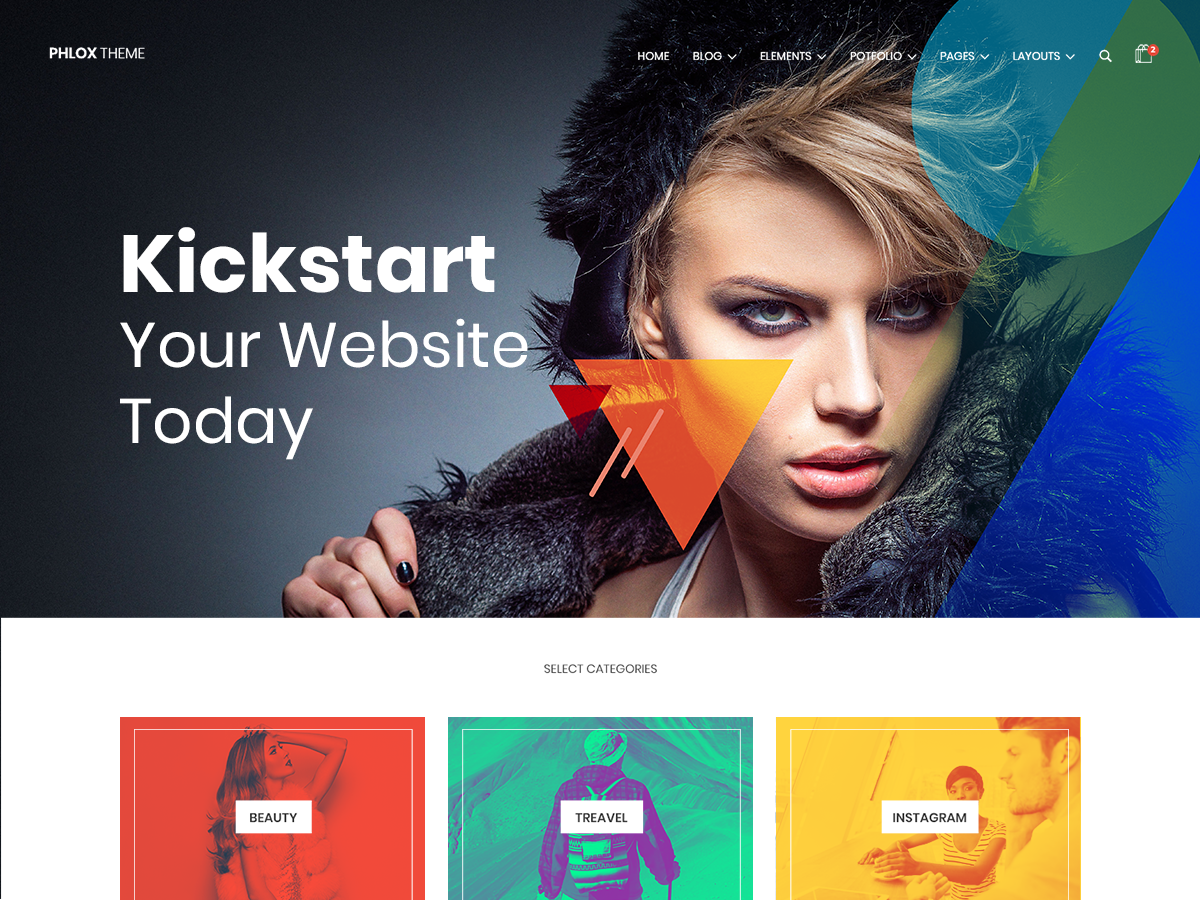
Themes are essential for maintaining the appearance and functionality of your website. WordPress has several free and premium themes from which you can choose one that matches your design ideas. WordPress has default themes that can be customized to fit your preferences and brand identity. We recommend you check out the Phlox theme, which is suitable for almost all websites.
 

Phlox theme


 Phlox is best compatible with Elementor, a page builder plugin on WordPress. The theme is perfect for any website, including a clothing store.

Phlox is a responsive, fast, and free theme optimized for SEO. It has a user-friendly interface and a live drag-and-drop feature for easy page customization. The theme is also compatible with WPML to support language translations. The built-in e-commerce functionalities in the theme simplify product management.

Phlox offers 250+ templates for you to choose from. You can select prebuilt templates for your clothing store from the vast collection. Phlox also has a smart one-click demo importer feature that makes it easy to import demos. 

With the Phlox theme, you can design and customize single product pages on your clothing store. You can choose a template from the product options panel and apply different templates for each product page. With this theme, on your product page, you can add functionalities like product ratings, page navigation buttons, product sharing buttons, stock keeping unit section, display wishlist,  etc. Also, you can add images in different aspect ratios. When shopping, adding related products to the product page can boost sales. You can customize the appearance, style, label, and other features of the related products section.

How to install the Phlox theme

Like any other theme, Phlox can also be installed from the WordPress theme directory.

  • After downloading Phlox, go to Appearance > Themes > Add new theme on the WordPress admin panel’s dashboard.
  • Click on the upload theme button on the page and upload the zip file of the downloaded theme.
  • Click on the activate button on the Phlox thumbnail image.

OR

  • On the WordPress dashboard, go to Appearance> Themes > Add new theme
  • Search for the Phlox theme
  • Click on Install> Activate.
  • After activating the theme, you can access the Phlox dashboard in the options to customize the theme.


How to install a template (Demo)

  • Go to the Phlox dashboard.
  • Click on Demo Importer. There are several templates to choose from, including free and pro versions. 
  • Select a template, and you can view the template by clicking on the preview button.
  • Click on Import > Continue > Install the required plugins.
  • In the next step, you get the option to select either a complete pre-build website or selected data only. Click on the complete pre-build website option and then click on import content.
  • Within a few minutes, the full template will be imported.

Install WooCommerce plugins

To convert your WordPress website into an eCommerce store, download the WooCommerce plugin. It has several features free of cost and is ready to convert your website into a fully functional online store. The WooCommerce plugin allows you to add payment and shipping options to your store, access analytics, manage inventory, display products, and customize your online store with many more features.

  • To install the WooCommerce plugin, go to the WordPress dashboard and click on Plugins> Add new plugins.
  • Search for WooCommerce
  • Click on install > activate.

  • Click on Let’s Go, where you will be asked to fill in details to finish the setup.

 

Conclusion

With technological advancements, online shopping has become more popular. As a result, businesses are turning to digital platforms. Website building can be a challenge if you lack technical expertise. However, you can create a user-friendly and responsive clothing store using WordPress. If you carefully follow the above steps, you can create an online store even without any technical expertise. Using a good-quality theme like Phlox can enhance the appearance and functionality of your website. With the right tools, you can effortlessly create your online store.